
Creative Tools · ICUNI Labs
2nd Brain
A personal knowledge garden built around portable notes and connections.
The build story 5 minute read
2nd Brain: Turn Saved Reading into Knowledge You Can Find Again
At a glance
- Purpose
- A personal knowledge garden built around portable notes and connections.
- The build
- A Markdown-first knowledge vault with a local AI ingestion watcher, optional Google imports and a parallel Apps Script engine. Public examples are fictional.
In this story
By Menelek Makonnen · ICUNI Labs
A Markdown-first pipeline for turning captured material into linked knowledge, while keeping the source and the processing boundary visible.
2nd Brain helps you turn saved reading into linked notes you can return to, connect and question. It gives researchers, students and builders a route from “I should remember this” to a Markdown knowledge collection with source links and an index.
Saving a document is a very efficient way to feel as though you have learned it. Three months later, the folder contains seventeen PDFs, a heroic naming convention and a strong sense that the answer is probably in there somewhere.
I built 2nd Brain to put a small processing workflow between capturing material and losing it politely. It is a Markdown-first knowledge system: selected source notes enter an inbox, a configured model proposes a structured synthesis, and the engine writes linked wiki material and index entries.
The product is a file-based pipeline rather than a conventional application interface. You can inspect its outputs in a Markdown environment, keep the original source and understand which stage has run. The filing cabinet gets a modest job description.
Move from collecting information to making connections
Start by placing selected Markdown source notes in the raw-input folder. You can process the pending collection in one pass, or leave a local watcher to notice stable new files. Processed material and assets stay outside that intake, so yesterday’s output does not come back disguised as today’s new reading.
For each source, the engine asks the configured model for a source description, summary, key points, entities and proposed links. It includes the vault instructions and current index, giving the request context about the collection the note is joining. For someone studying a recurring topic, the useful question is how the new material relates to what is already there.
The aim is useful organisation. A reading note can identify a concept, connect it with another source and give the owner a place to return. The generated account still needs human judgement; a tidy summary is not independent evidence that the model understood the source correctly.
I wanted the result to remain inspectable. Markdown carries the knowledge in ordinary files, and source links preserve the route back to the material. The system should help the next reading rather than replace it with a beautifully formatted rumour.
Keep the original and know what needs another attempt
After a successful response, the engine writes wiki material, updates the index, records the ingestion and moves the source into a processed folder. Filename collisions receive a suffix rather than silently overwriting the earlier source.
When no provider is configured, the file stays in place. Model or parsing failures also leave it available for another attempt. That is a useful recovery boundary: detecting a file is different from successfully processing it.
Those are concrete development lessons. A model response is untrusted input to the next stage, and “the file exists” is a very low standard for deciding that useful knowledge has been added.
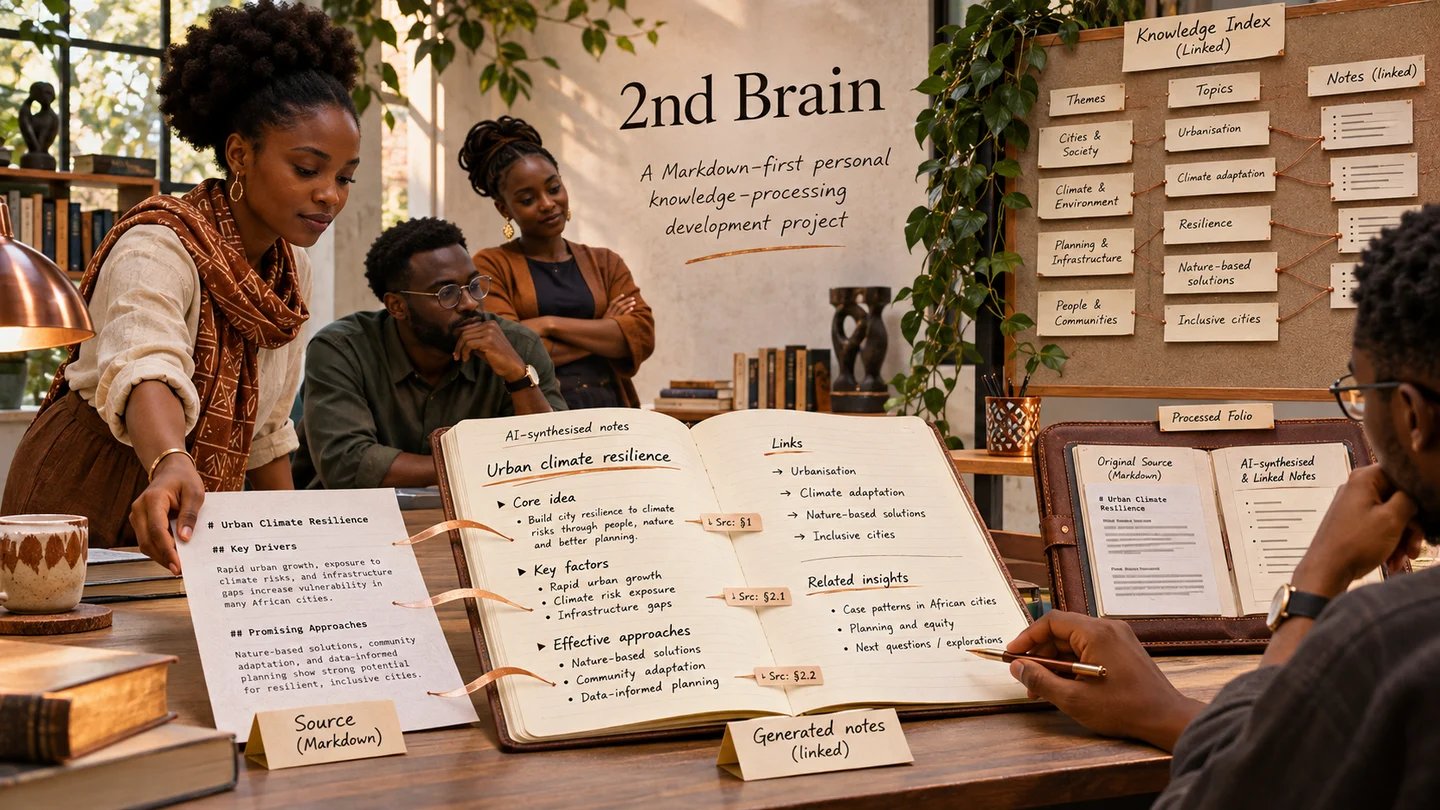
The knowledge journey: capture, request a structured synthesis, inspect linked outputs and preserve the source.
Choose what enters the notebook
Optional Google connectors import selected document, email and calendar material into Markdown. The local sync path tracks imported identities in a state file so the next pass can recognise what it has already handled. Individual message or document failures can be reported without turning every successful import into a failure.
A separate Apps Script Lite implementation can process Drive-hosted material on a schedule.
That flexibility brings an explicit sharing boundary. Processing sends source text, index context and instructions to the configured model provider. The compatible-endpoint option may be local or remote depending on its configuration. Calling the vault “local” does not make every inference local by association.
The owner needs to choose permitted material and an appropriate provider deliberately. Importing an email and analysing it are separate decisions with different consequences. Useful automation begins with knowing which one has been authorised.
Use ordinary files, with a deliberately small engine
The implementation uses JavaScript modules and Node.js, with Chokidar for watching files and Google APIs for optional Workspace imports. Its model-client layer supports several provider routes and a configurable compatible endpoint. Google Apps Script supplies the cloud Lite path.
The working surface is Markdown and commands in the owner’s chosen host. I have not built a separate visual application shell for it. The paper-and-ink illustrations here give the idea an editorial identity; they are conceptual artwork, rather than a screenshot or an existing product logo.
Building 2nd Brain reminded me that useful automation often begins with a very ordinary question: will the next person understand what happened? Here that person may be me, three months older and no wiser about where I put the article. Stable input, a source-linked result and a processed-file move need distinct meanings so I can find the work and resume it.
The next improvements follow the same principle: validate model output more strongly, reconcile existing pages properly and verify each configured integration against synthetic material before trusting it with a working vault.
2nd Brain: sources into linked knowledge.
Let the folder earn its name
2nd Brain gives captured material a route towards a usable knowledge collection. It keeps the original, proposes relationships and makes processing more explicit than simply dropping another file into a folder.
The human still supplies the judgement about what is worth keeping and whether the synthesis is right. That is a reasonable division of labour. The filing cabinet can do some filing before requesting credit for enlightenment.
Back to the story’s beginning ↑
Project details
A Markdown-first knowledge vault with a local AI ingestion watcher, optional Google imports and a parallel Apps Script engine. Public examples are fictional.
Inside the workflow
A Markdown-first knowledge vault with a local AI ingestion watcher, optional Google imports and a parallel Apps Script engine. Public examples are fictional.
Have something in mind?
Bring the problem, the audience and what you want to make possible.
Discuss your project