
Experiments · ICUNI Labs
AutoAntigravity
An experiment in configurable assistance around approval-heavy development workflows.
The build story 5 minute read

AutoAntigravity: Reduce Repetitive IDE Interruptions Deliberately
At a glance
- Purpose
- An experiment in configurable assistance around approval-heavy development workflows.
- The build
- An IDE extension prototype explores approval automation, interface handling and prompt-fragment suggestions. It is not offered as a ready-to-install tool.
In this story
By Menelek Makonnen · ICUNI Labs
AutoAntigravity helps developers configure repetitive approval interactions in supported IDE workflows and reuse useful instructions while composing prompts. It lives inside the development environment, with settings, status and action records explaining what the automation is set to do.
The problem is familiar to anyone directing a coding assistant: a useful stretch of work repeatedly stops for the same interaction, and I become a highly qualified extension of the Enter key. Removing that friction can be useful in a deliberately controlled environment. Removing the meaning of permission would be a rather more expensive feature.
I built the extension to work on that distinction. It combines supported native execution policies with recognition of particular remaining forms, keeps artifact and review contexts separate, and offers Orbit prompt fragments as editable composing material.
The fit is a deliberately controlled, repetitive workflow with understood permission choices. Convenience is useful when I can see what it is configured to do and retain the review decisions that deserve my attention.
Work inside the IDE
AutoAntigravity uses the host extension API for its commands, state, status indicators and settings webview. It is part of the development environment rather than another standalone dashboard demanding a place on the screen.
Its settings expose polling cadence, debugging connection details, acceptance preference, command-pattern exclusions, background behaviour and diagnostics. That gives the operator a concrete configuration surface. The selected preference can distinguish a one-time choice from a project or global permission where the recognised host form offers those options.
For repetitive work in a controlled environment, the intended benefit is keeping an understood workflow moving. For development of the adapter itself, the diagnostic view helps identify why a particular host dialog is no longer being recognised.
The right starting point is an isolated IDE profile with deliberate settings. This extension can change global terminal policy when configured, which is a real authority decision, rather than a cosmetic convenience toggle.
The form changed; the adapter had to change
A supported workflow can stop being useful when the host changes its permission form. In v4, I adapted the earlier single-button approach to multi-choice selection followed by submission. The goal was to preserve the configured choice through the changed interface, rather than keep enthusiastically clicking a button whose job had moved.
The current design combines supported native settings with a Chrome DevTools Protocol adapter for recognised remaining forms. The adapter connects to local Chromium debugging pages, identifies the relevant controls, selects the configured preference and handles the submission stage.
It also contains exclusions for artifact and review contexts. The old blind command-acceptance path is disabled in the implementation. That was a useful lesson: a command that sounds like “continue” can still move focus into a context where continuing is exactly the decision a person should make.
An interface can change its clothes without changing its meaning. It can also change its meaning while leaving a button in precisely the same place. Coordinates alone have a fairly limited education.

Configure and recognise: adapt to the permission form and retain a separate human review context.
Patterns are a guard, not a mind
The extension includes built-in and configurable command patterns. Its helper can use substring and optional regular-expression matching. Those checks can identify known disallowed forms; they do not understand every possible shell program or create a security sandbox.
I want that boundary clear because it changes how the tool should be evaluated. A synthetic fixture can demonstrate that a particular dialog is recognised and a particular pattern is blocked. That is useful evidence for those cases. It is not a certificate for arbitrary future commands.
Lifecycle state deserves the same precision. The activation path enables automation again, and deactivation does not restore previous global policy values. An off indication inside one session therefore has a narrower meaning than a verified persistent shutdown across reactivation.
That finding is a concrete engineering lesson: convenience features need explicit exit behaviour. An automation tool should make its authority and lifecycle as legible as its happy path.
Reuse a thought without executing it
The Orbit fragment integration handles a different kind of repetition. A local fetch obtains reusable prompt fragments, caches them and supplies suggestions to the IDE's chat composer.
The operator chooses a fragment as part of writing the instruction. The resulting prompt remains something to review and edit.
This is useful for recurring context or carefully worded instructions that should not have to be reconstructed from memory every time. The integration crosses extension, local service and page contexts while keeping the composing step visible.
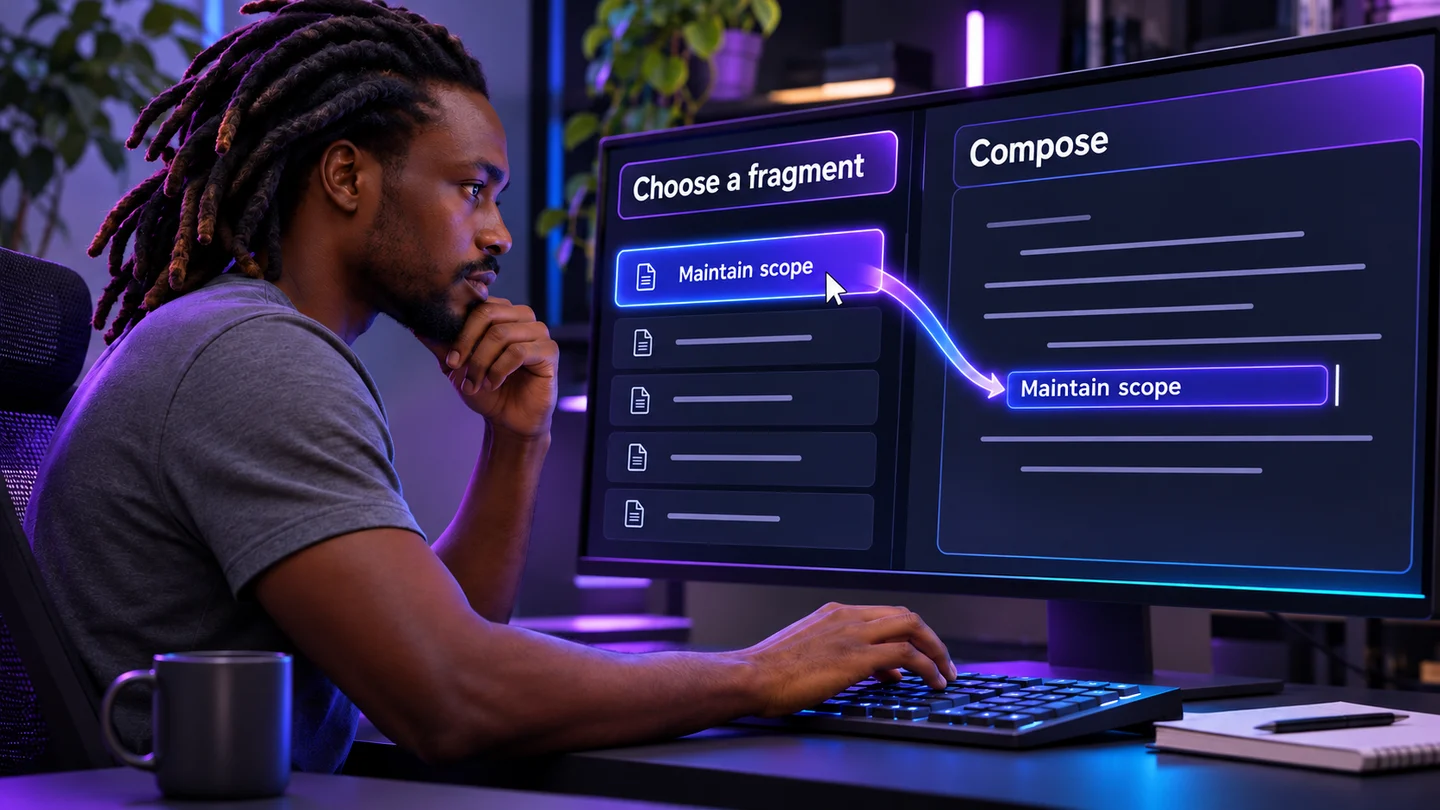
Prompt fragments: choose reusable context and compose the final instruction. insertion is separate from execution.
What I took from the build
AutoAntigravity uses JavaScript, the VS Code-family extension API, a settings webview and CDP-based browser integration. Separate auxiliary manager scripts have their own build path.
The engineering challenge was joining the things a developer actually encounters: native settings, changing forms, review contexts and repeated instructions. JavaScript and the extension API let those pieces sit inside the IDE. The action record can explain an interaction; I would still need separate evidence to claim it saved time or made the resulting code better.
It has reinforced a useful principle for my automation work: reducing friction increases the need to describe exactly which friction is being removed, which decision remains with the person and what survives a restart.
Retire from the Enter-key department
AutoAntigravity is useful as a configurable adapter for a specific, understood workflow, with reusable prompts alongside the approval handling. Its current lifecycle behaviour also gives me a concrete improvement target: activation reenables automation, and deactivation does not restore earlier global policy values.
That lesson travels beyond this extension. When I remove repeated interactions, I need to make the remaining authority and the way out easier to understand.
The human can have a better job than impersonating Enter. Choosing the permissions is still a job worth keeping.
Back to the story’s beginning ↑
Project details
An IDE extension prototype explores approval automation, interface handling and prompt-fragment suggestions. It is not offered as a ready-to-install tool.
Inside the workflow
An IDE extension prototype explores approval automation, interface handling and prompt-fragment suggestions. It is not offered as a ready-to-install tool.
Have something in mind?
Bring the problem, the audience and what you want to make possible.
Discuss your project