Creative Tools · ICUNI Labs
AutoNotebook
Making generated learning media easier to queue, recover and bring into a wider production flow.
The build story 8 minute read

AutoNotebook: Turn NotebookLM Generations into an Organised Story Series
At a glance
- Purpose
- Making generated learning media easier to queue, recover and bring into a wider production flow.
- The build
- The desktop queue coordinates NotebookLM video generation, admission planning and artefact recovery. Local cataloguing and an Orchestra handoff remain separate stages.
In this story
By Menelek Makonnen · ICUNI Labs
AutoNotebook helps creators turn NotebookLM generation into an organised production workflow: define a set of stories, follow their jobs and bring the resulting media into a named local catalogue. NotebookLM generates the material. My desktop application manages the work around it.
That is useful for an educational series, a source-led narrative project or a creative pitch with several pieces drawn from the same notebook. Each story gets its own title and focus, while shared direction keeps the batch coherent.
Without that structure, a productive afternoon can become three files called “video”, two uncertain submissions and a browser tab I am afraid to close. I built AutoNotebook because remembering which story is still generating should not become the most demanding narrative exercise in the room.
The application keeps the brief, accepted remote work, recovered files and downstream handoff connected. It does not replace NotebookLM or manufacture extra entitlement. Its value is letting me return to a batch and understand what exists, what is waiting and what deserves my attention.
Give each story a specific job
The Create workspace, Forge, begins with a synced notebook. A batch contains individual story titles and focuses, together with shared visual and storytelling direction and a chosen output type.
Those individual focuses matter. A notebook might support an introduction, a character-focused account and a separate explanation of the turning point. They can share the source base and visual intention while asking different questions of the material.
For a source-led narrative project, I can define what belongs in each piece instead of submitting the same vague summary request repeatedly and hoping variety will emerge out of politeness. For an educational series, the focus can separate concepts that would otherwise compete inside one video. For a creative pitch, distinct stories can explore different parts of the same world.
The shared direction gives the batch a common instruction. The titles give the resulting jobs useful identities. The focuses give those jobs a purpose beyond filling a slot in a queue.
I care about that structure because a batch should be a collection of intentional pieces. Twenty requests for “something interesting” is a vague meeting that has learned to consume credits.
Validate the brief where it enters
Before spending generation capacity, I want every piece to have a reason to exist. Forge holds incomplete rows, and the desktop handler independently checks the notebook, distinct titles, individual focuses and shared direction. That catches an unfinished brief before it becomes an unfinished video with a queue number.
That second boundary matters in an Electron application. A disabled button is useful interface behaviour; it is not the only place the business rules should live. Another caller reaching the same operation still needs a valid request.
The batch then becomes explicit per-story job input. Each job carries its context rather than depending on an enormous bulk prompt whose internal divisions have to be rediscovered later.
This is a useful design lesson for production tools: validate the unit of work, then retain its identity through the process. The filename at the end is much easier to explain when the request had a name at the beginning.
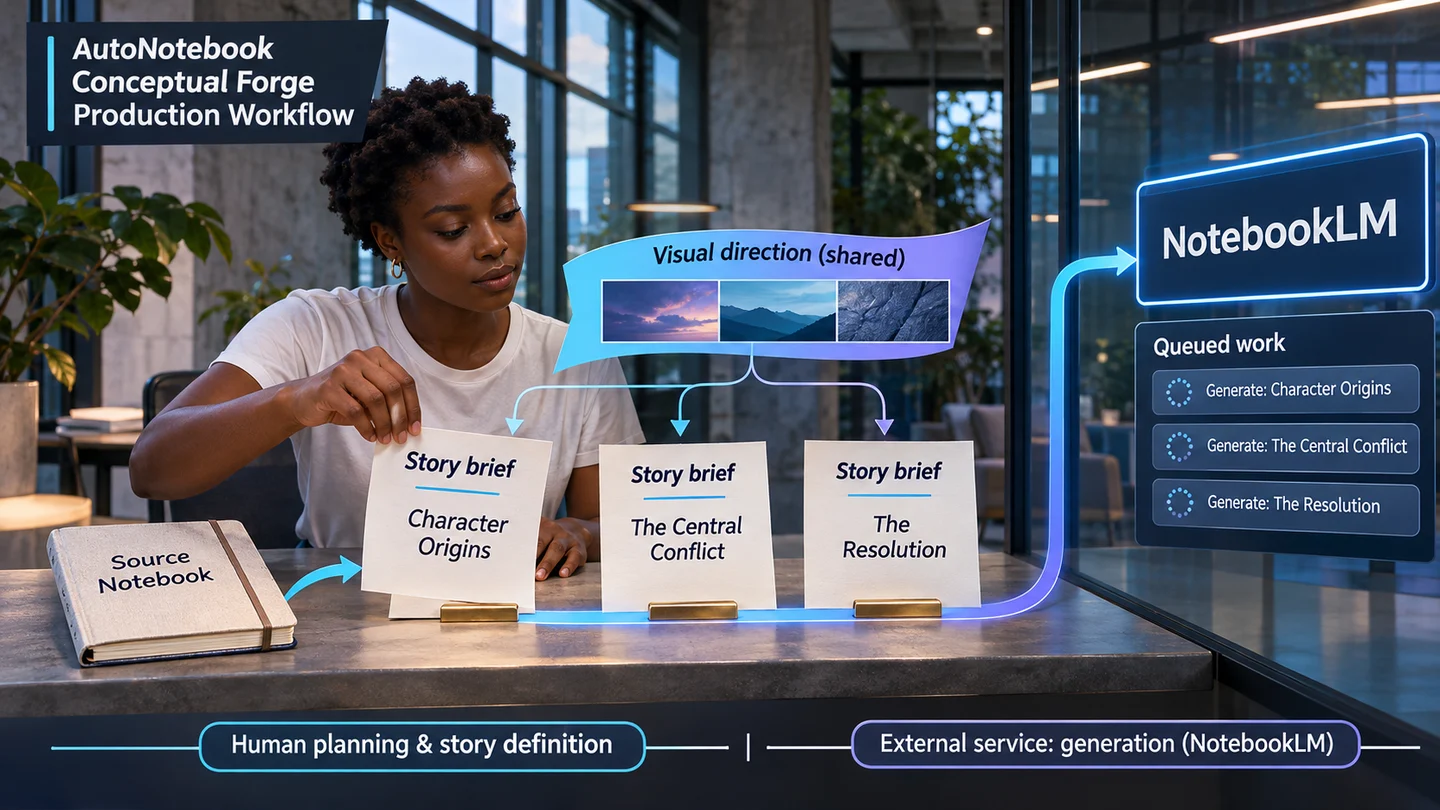
Forge: choose the source notebook, define individual story focuses and carry shared direction into the external generation workflow. NotebookLM is the generation provider.
Ask the current account, not yesterday's cache
Before admitting new work, the production runner checks the live NotebookLM plan. Stored entitlement information does not replace that check, because an account or plan can change between runs.
A rolling credit tracker and a reservation gate constrain new submissions. The capacity check happens again near the point of submission, where it can account for other work already reserved. That makes quota part of the operating model rather than a surprise delivered halfway through the batch.
For the producer, the practical distinction is between a complete-looking brief and work that can actually be admitted now. A hold at that boundary is a useful state. It preserves the intended job without pretending the remote service has accepted it.
It also keeps the application honest about where authority lives. AutoNotebook coordinates an external service through its browser behaviour and signed-in profile. It does not create an entitlement by drawing a more impressive status badge.
This is the kind of detail that becomes important only after the first optimistic version works. The next version needs to handle the same project tomorrow, under the account that is actually present tomorrow.
Recover the work that already exists
When I reopen an interrupted batch, AutoNotebook first looks after accepted work that needs reconnection or download. It retains remote artifact identities and credit-recording state, so a closed local session does not automatically become an excuse to submit the story again. Recovering the work already in progress is more useful than producing a second billable version of my confusion.
That is the useful recovery question: can I reconnect to the artifact already being produced? Starting another request is a different action, with a different quota consequence.
The broader lesson is to preserve the external identity alongside the local one. Otherwise recovery becomes a very confident way of forgetting that someone else is still working.
Bring the artifact home deliberately
Delivery derives a safe story filename and a per-notebook destination. Path handling constrains the resolved output beneath the configured root, so an imported title cannot nominate an adventurous new location for the video.
The runner rejects an empty download, can copy the file to an export directory and records local and export paths, size, available hash, remote artifact identity and handoff state. Those fields make a result useful as production material: a named story with a location and a traceable origin.
The catalogue arranges entries by output type, generation date and safe notebook or story name. When a retry finds a usable earlier catalogue entry under its matching identity, it can reuse that record and refresh file metadata rather than blindly creating another local entry.
Its file-usability predicate is deliberately narrower than creative acceptance. A size and MP4 header check is a technical observation. It cannot tell me whether the video used the right scene, preserved a character or explained the intended idea. Viewing the artifact remains part of production.
I like that division. The application should make the files findable and the job history understandable. It should not award an artistic prize to a container header.
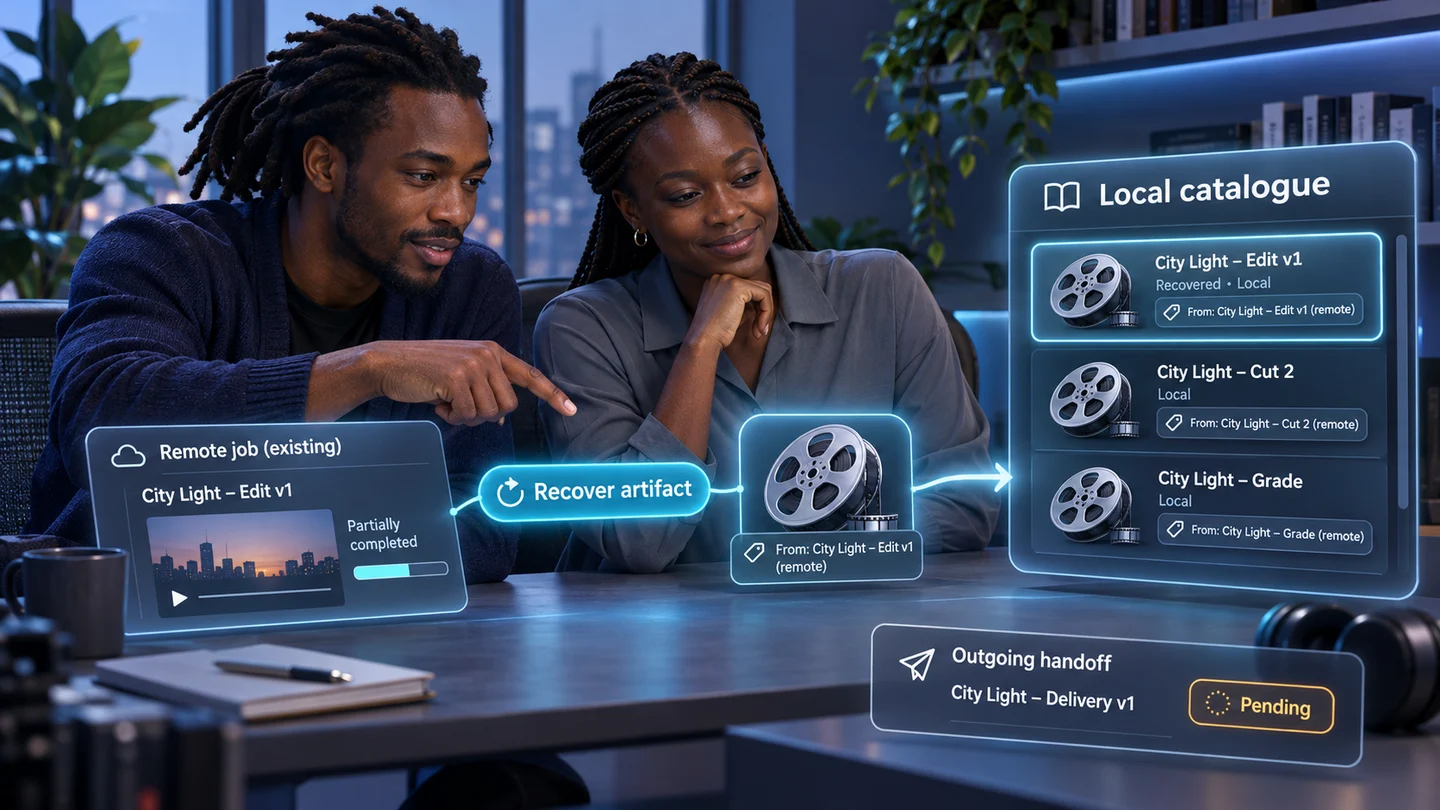
Recover and catalogue: reconnect accepted work, retain the artifact's context and distinguish local delivery from downstream indexing.
Keep the handoff separate from the file
After cataloguing, AutoNotebook can request an Orchestra handoff. Indexed and deferred results remain distinct, and a later outbox flush provides another attempt where appropriate.
That separation matters when the next tool is temporarily unavailable. The downloaded file can be present locally while downstream ingestion still needs attention. Calling the entire chain complete would hide exactly the information the producer needs next.
It is a pattern I use across production tools: preserve the useful result, expose the unfinished connection and retain enough identity to reconcile it later. A pipeline should not make every successful stage hostage to the last service in the room.
What the desk is made of
AutoNotebook uses Electron, React and JavaScript, with a CLI and scheduler alongside the desktop interface. SQLite contributes notebook records; a local file queue tracks production work; browser automation coordinates the external service. The shell separates Production, Create, Projects, Vault and Settings.
The visual system uses slate, sky blue and indigo with translucent surfaces. I wanted the interface to feel like a production workspace: the brief, the active jobs and the resulting material have different places, but remain part of one job history.
The strongest creator work is in that continuity. Admission, remote execution, reconnection, safe delivery and cataloguing have different failure modes. Giving each stage a clear contract makes the whole application easier to understand when one of them needs help.
Give the series a memory
AutoNotebook helps me move from one source notebook to a collection of intentional pieces, with titles and focuses before generation and a usable file catalogue afterwards. A quota hold, remote job, local download and deferred Orchestra handoff can each tell me what to do next.
Building it reinforced a practical strength I bring to production tools: connecting the creative brief to the unglamorous delivery work that makes the result usable. A video is much easier to find when the system remembers what I asked for.
Three files called “video” may still arrive. They no longer have to spend the rest of their lives pretending they are unrelated.
Back to the story’s beginning ↑
Project details
A desktop queue coordinates NotebookLM video generation, admission planning, artefact recovery, local cataloguing and an Orchestra handoff.
Design and technical decisions
The desktop queue coordinates NotebookLM video generation, admission planning and artefact recovery. Local cataloguing and an Orchestra handoff remain separate stages.
Inside the workflow
A desktop queue coordinates NotebookLM video generation, admission planning, artefact recovery, local cataloguing and an Orchestra handoff.
Have something in mind?
Bring the problem, the audience and what you want to make possible.
Discuss your project