
Experiments · ICUNI Labs
FlowLink Downloader
A download cockpit that keeps generated media and its prompt context together.
The build story 5 minute read

FlowLink: Take Your Google Flow Clips into the Edit with Their Prompts
At a glance
- Purpose
- A download cockpit that keeps generated media and its prompt context together.
- The build
- A Google Flow browser tool combines project metadata, per-item queues, prompt ledgers and distinct direct/native quality paths.
In this story
By Menelek Makonnen · ICUNI Labs
FlowLink helps filmmakers take selected Google Flow videos into a local editing workflow without leaving their prompt and project context behind. Review clips, choose what is worth keeping and export video, prompt information or both through a visible queue.
A generated take may be useful for a trailer, a product film or a larger narrative sequence. A week later, the equally useful question is which experiment produced it. I built FlowLink so a beautiful clip does not arrive in the editing folder with the explanatory range of a nightclub flyer.
The platform generates the video. My extension supplies selection, naming and a ledger around the handoff. It connects available workflow metadata to the selected media, including cases where an upsampled version has less context than the original generation.
The benefit is a collection I can return to and understand. Quality routes have different platform consequences, including possible service credits, so choosing delivery remains a deliberate part of the job.
Give the project a cockpit
FlowLink adds a full-window workspace with Dashboard, Media and History destinations, source cards, selection controls, a queue and a media viewer. Video, prompt and combined-output modes let the task start with the intended result.
For a filmmaker assembling generated material, that creates a useful selection loop. Scan the project, inspect the candidates, play the relevant clip, read its prompt and choose the material worth bringing into the edit.
The viewer keeps playback and prompt context close together. That matters when several variations look similar as thumbnails but differ in movement or the particular moment they deliver. A contact sheet is helpful; it has yet to develop a convincing opinion about camera motion.
Concurrency is also explicit. The queue advances selected work within the chosen active limit instead of turning every card into an unrelated download button.
Match the clip to its working history
That relationship is the important engineering decision. The latest media URL is not necessarily the richest record of how the clip was made. FlowLink collects the title, prompt, dates, model and media identity where the project supplies them, then associates them with the selected item.
For a product film, the result can preserve the difference between a chosen hero take and a nearby experiment. For a narrative sequence, the prompt can help identify the intended action or framing when the clip is reused later. The context is a practical index, rather than a promise that repeating a prompt will reproduce the same video.
When metadata is missing, the item remains labelled accordingly. A blank prompt is inconvenient. An invented prompt is a much more expensive kind of convenience.
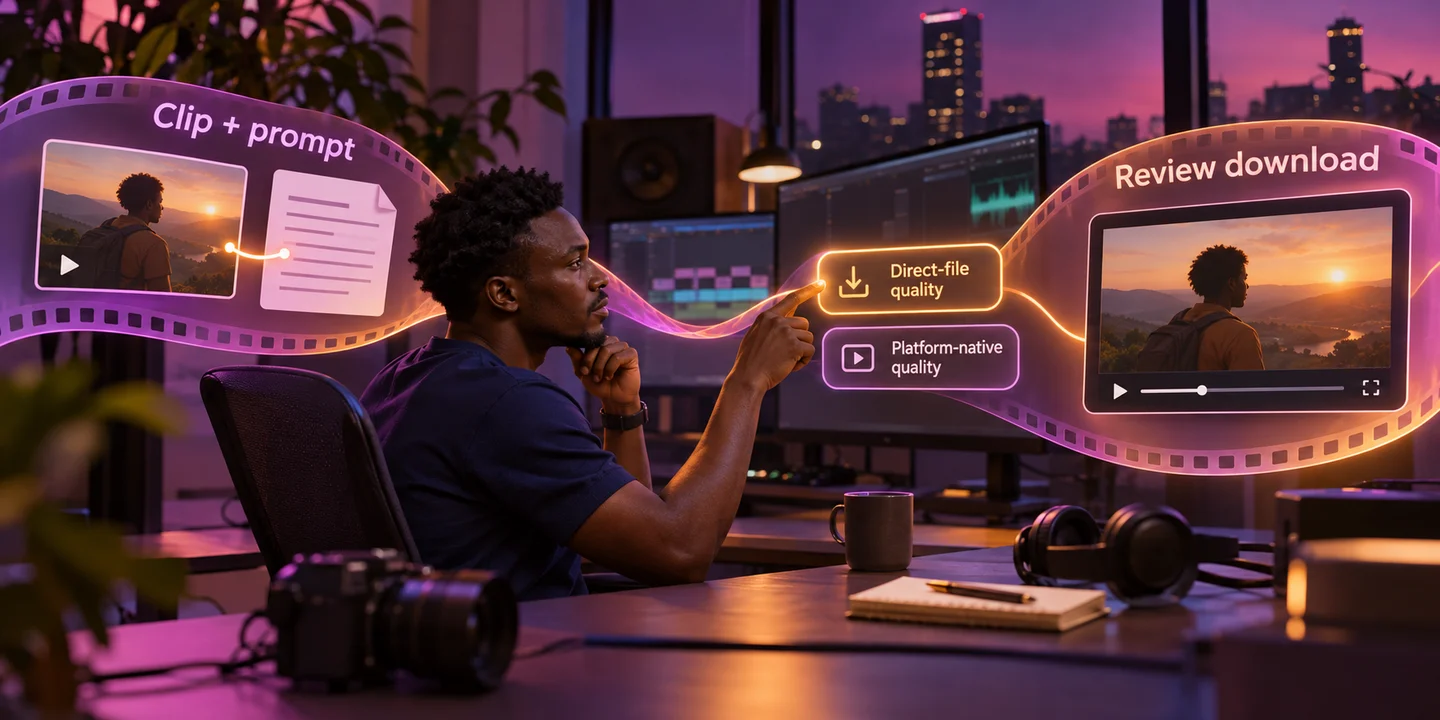
Select, connect and deliver: keep the clip's identity and prompt attached through the export decision.
Quality choices have different journeys
FlowLink uses different delivery strategies for different quality options. Lower-resolution choices follow a direct fetch-and-save path into the user-granted directory. Higher-quality choices request the platform's native download interaction through a background tab.
Those are different operations, and I want the description to preserve that difference.
The native interaction can also reach platform confirmation steps, including operations that may consume service credits. It belongs to a deliberate export decision with those consequences understood. A quality label should not conceal what the platform is being asked to do.
Prompts-only mode skips video fetching. That is useful when the immediate job is organising the creative record rather than collecting another copy of every clip.
Make the ledger useful to the next tool
Export names combine a sanitised title or prompt fragment, available date, selected quality and a workflow or item suffix. A consolidated Flow_Prompts.csv retains the associated context.
That gives the next editing stage something to work with: recognisable names and a small project record beside the media. The CSV is the ledger in this route, rather than a separate text file for every prompt.
I built FlowLink with JavaScript, Manifest V3 content and background scripts, extension messaging, native browser interactions and user-granted filesystem access. It is part of my reusable export-tool family, with its own Google Flow metadata and quality adapter.
Building this family taught me to reuse the useful interface while adapting the real platform behaviour. A filmmaker should be able to recognise the selection workflow without being misled about what a native download request proves. That is the value of the site-specific adapter beneath the familiar cockpit.
Bring the intention into the edit
FlowLink helps a creator move chosen footage out of Google Flow with recognisable names and a prompt ledger, ready to inspect for the next stage of a project. I can keep the take and the thinking around it in the same working collection.
It does not promise that a native request completed a download or that repeating a prompt reproduces the video. Its useful job is making the handoff understandable.
The clip can still look magnificent. Tomorrow, I would like to know why I kept it.
Back to the story’s beginning ↑
Project details
A Google Flow browser tool combines project metadata, per-item queues, prompt ledgers and distinct direct/native quality paths.
Inside the workflow
A Google Flow browser tool combines project metadata, per-item queues, prompt ledgers and distinct direct/native quality paths.
Have something in mind?
Bring the problem, the audience and what you want to make possible.
Discuss your project