
Business Systems · ICUNI Consult
iRegister
Making company-registration preparation easier to follow through a type-aware guided journey.
The build story 6 minute read

iRegister: Enter Formation Details Once and See the Document Packet You Need
At a glance
- Purpose
- Making company-registration preparation easier to follow through a type-aware guided journey.
- The build
- The wizard saves a registration draft and prepares a case-specific form packet. Server-verified payment gates filled-PDF generation and one-time download authorisation.
In this story
By Menelek Makonnen · ICUNI Consult
iRegister helps a founder organise company-formation information and turn it into a supported, case-specific document packet. A guided wizard asks questions for the chosen entity type, reuses people across relevant roles and shows which answers or signatures are still needed before generation.
The tedious part of forms is often the repetition. A name appears in several places. The same person may be a director and a subscriber. One missing answer can block a document, but the founder only discovers it after working through everything else. Administration has a remarkable talent for making the company name travel more than the person starting the company.
I built iRegister to put one answer model behind that repeated work and let the founder see the packet taking shape. Its role is preparation: the application controls its filled-document release, while current official requirements, submission and regulatory acceptance remain outside the promise. No amount of excellent form filling lets me approve a company on the registrar's behalf.
Answer questions that belong to the business you are forming
One shared wizard supports company-by-shares, guarantee, unlimited, external-company and sole-proprietor paths. It changes steps and labels to match the selected structure: directors, subscribers or members, proprietor, guarantee structure or local manager.
That is a meaningful product decision. A sole proprietor should not have to negotiate irrelevant shareholder screens simply because the form designer began with a company. An external-company case needs its own office, agent and supporting confirmations.
The store validates each step before advancing. Company details, contact/address formats, share relationships and required people receive relevant checks. Sector choices can suggest a business-description starting point, while the user still supplies the actual context.
Those checks are the rules encoded in this version. They organise input readiness. A validation engine should understand the limits of its authority even when its error messages sound very certain.
Reuse a person’s details and see which roles they support
People appear in more than one role during formation. iRegister can link a subscriber to an existing director rather than requiring another independent transcription of the same identity. Ownership and attestation relationships feed the packet planner.
The review step collects drawn signatures, with corporate paths carrying their applicable stamp and attestation inputs. The important question is which person or organisation supports which planned document, rather than whether the interface has collected an impressive number of signature images.
The step rail and completion bar give progress a practical meaning. Missing-field counts can appear against a step already visited, and review has separate summary, form and signature views. The rail resizes, preserving room for either the navigation or the task in front of the user.
I wanted the founder to see the state of the case, not merely a procession of screens. Reaching the last page should mean something more than winning an endurance contest against Next buttons.
Find the missing answer before it blocks the document
The planner derives the document set from entity type, people, ownership and signer evidence. It maps missing inputs to the forms they block and detects duplicate output names. Generation remains blocked until the planned artifacts have their required answers and signatures.
For a founder reviewing the case, the packet plan turns “something is missing” into a task they can act on. It shows the document affected and the answer or signature it needs. Different entity structures and people can lead to different packets; the interface explains that instead of promising every case the same bundle with reassuringly identical file counts.
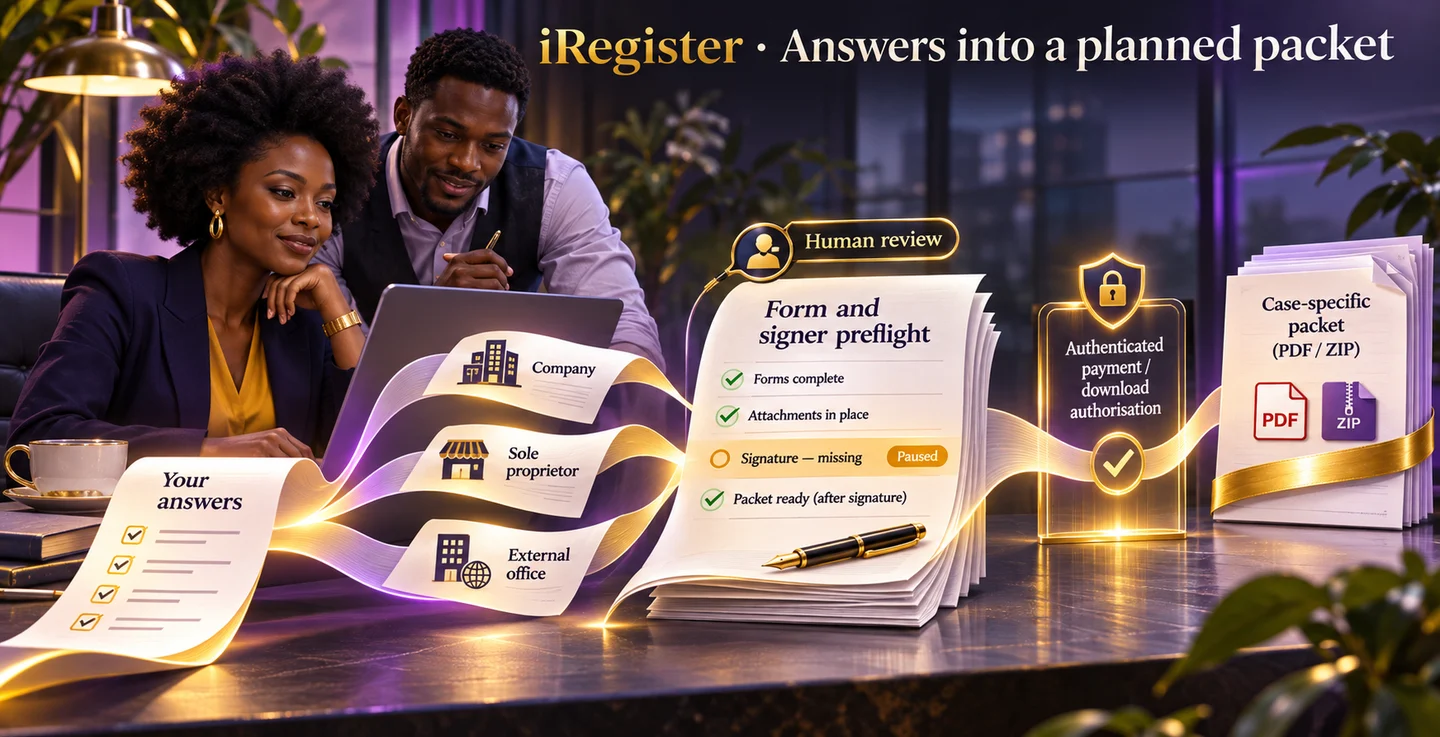
Packet workflow: answer the relevant questions, inspect missing form/signature evidence and generate the authorised document set.
Release the filled packet from the latest authorised answers
Blank templates can be downloaded through the browser path. Filled packets use an authenticated server route. The review screen first synchronises the latest answers, then requests a short-lived one-time download token.
The server retrieves the session-owned registration, checks its paid state, reassesses the saved packet and validates the token against the user and registration. It fills the supported templates and returns a ZIP with packet identity, artifact count, state fingerprint and a SHA-256 receipt.
Payment verification checks the provider response against the server-side amount. Repeated verified payment can return the existing success. That authorises the application service; it does not purchase an approval from the registrar by proxy.
The browser deliberately avoids falling back to client-side filled generation when that server path fails. A failed synchronisation should not release a packet based on older saved answers just because a download button is feeling helpful.
How I connected answers, signatures and the generated files
I implemented the product with JavaScript, Next.js, React and Zustand, with pdf-lib, JSZip and a signature canvas supporting the document workflow. A Next API proxy holds the session boundary before Google Apps Script services and Google Sheets storage. Paystack verification supplies the payment-gating path.
The navy, gold and restrained purple interface keeps the steps and review legible, with the source document/check identity. The deeper work was modelling the relationships: which answer belongs to which person, which role needs a signature and which document depends on it. That model is what makes the founder's review more useful than another long checklist of empty fields.
Leave the founder with a plan they can understand
iRegister is for the founder who wants to organise the formation details without independently transcribing the same identity across every supported form. It connects the questions, people, signatures and planned outputs so missing information has a visible place to be resolved.
The remaining template, payment and deployed acceptance work matters because the files need to be right, not merely downloadable. I built the preparation journey to give the founder a clearer packet and fewer repetitive questions. They still have a company to build; the company name has done enough travelling for one afternoon.
Back to the story’s beginning ↑Project details
Project context: Ghana
A Ghana company-registration preparation wizard with saved drafts, case-specific form packets and payment-gated PDF generation. Current regulatory acceptance is not established.
Design and technical decisions
The wizard saves a registration draft and prepares a case-specific form packet. Server-verified payment gates filled-PDF generation and one-time download authorisation.
Inside the workflow
A Ghana company-registration preparation wizard with saved drafts, case-specific form packets and payment-gated PDF generation. Current regulatory acceptance is not established.
Have something in mind?
Bring the problem, the audience and what you want to make possible.
Discuss your project