
Experiments · ICUNI Labs
KlingLink Downloader
Collecting generated Kling media with the prompt context that belongs to it.
The build story 5 minute read

KlingLink: Bring Selected AI Video into a Usable Local Collection
At a glance
- Purpose
- Collecting generated Kling media with the prompt context that belongs to it.
- The build
- A Kling-specific extension discovers generated video records and exports media, prompt sidecars and a frequency CSV through a bounded queue.
In this story
By Menelek Makonnen · ICUNI Labs
KlingLink helps creators collect selected Kling videos into local project folders with the prompt context needed to recognise them later. Inspect the candidates, choose video, prompts or both, then keep readable names and supporting records alongside the footage.
For a filmmaker assembling externally generated clips, that is the work between a promising result and an actual edit. Several variations may look alike as thumbnails. The prompt and source identity give me another way to find the take I meant, rather than audition every MP4 for a role it cannot remember.
I built KlingLink as a platform-specific member of my export-tool family. It reuses a selection cockpit and queue, while adapting to Kling's available response data and visible component state.
Discovery is heuristic, so I still inspect the candidate before keeping it. The extension collects and organises what it can find. A useful handoff begins with choosing the right material.
Adapt to the shape of the page
To find candidate clips, KlingLink combines response interception with visible Vue-state discovery, looking for identities and MP4-like media values. That adapter does the repetitive collecting while leaving recognition with me. If the platform exposes several records for an experiment, the next useful action is to inspect them, not award the first URL a master-file certificate.
The content side searches those records for usable media URLs and prompt-like fields. That is a deliberately heuristic adapter.
For a creative session with several variations, that is a useful combination. The software does the repetitive collecting and matching. The editor does the recognition that makes the collection worth keeping.
Reuse the cockpit, specialise the adapter
KlingLink belongs to the same export-tool family as FlowLink and HailuoLink. It shares the idea of a visible cockpit, selected cards, target modes, a bounded queue and a prompt ledger.
The Kling-specific work sits in the data path. HailuoLink can recognise a more explicit feed schema; KlingLink combines recursive matching and component-state inspection. Those are different strategies serving the same user-facing goal.
That is the lesson I wanted the family to demonstrate. Reuse should give a new adapter a good working interface without obliging it to inherit another site's assumptions. A universal scraper is often a very local assumption wearing a larger hat.
The cockpit lets me inspect candidates, select the intended items, choose video, prompt or combined output and grant a destination through the browser. Queue state makes pending, active, skipped and failed work visible at the item level.
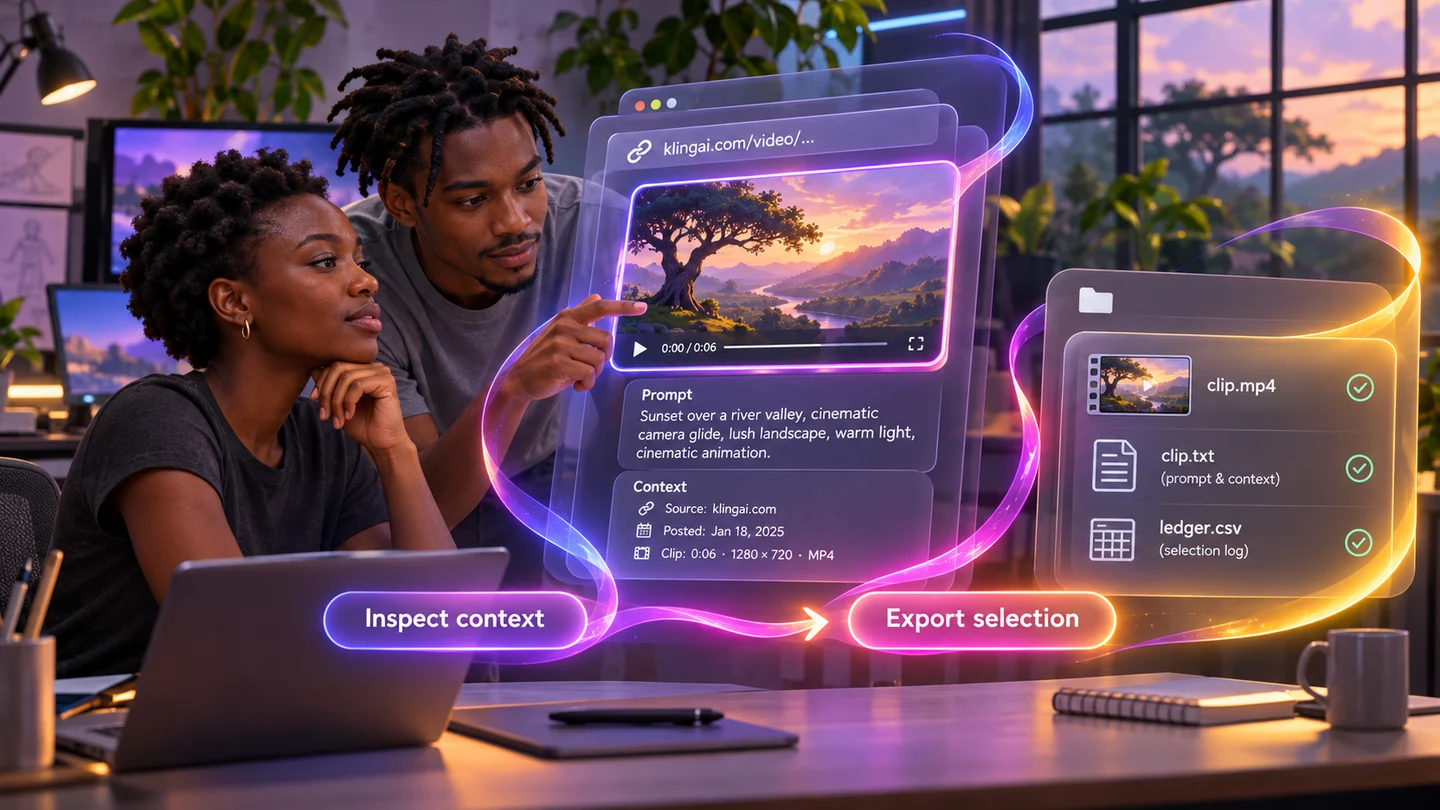
Discover, inspect and export: keep the chosen clip attached to its available context.
Carry more than a filename
The downloader fetches the exposed media URL, checks HTTP success and writes through File System Access. Prompt-derived naming and a source identity help distinguish the local result from neighbouring experiments.
An optional metadata text sidecar gives an individual clip a readable companion. Kling_Prompts.csv provides a consolidated prompt-frequency ledger for the session. That makes it possible to review the creative record without making every filename carry the entire prompt in public.
For an editing handoff, I can inspect the video, decide what context is useful and bring the selected material into the next tool. For my own experiments, the ledger gives a second way to navigate a session after the novelty of the thumbnails has worn off.
The existing-file skip uses the generated filename. The ledger remains session state, and fallback metadata is distinct from observed platform values. Those choices are useful within their actual scope; they do not create a durable universal media archive by implication.
Make progress precise
KlingLink is implemented with JavaScript, Manifest V3 content injection, a MAIN-world interceptor, extension messaging and browser filesystem access. There is no independent generation model or download service behind the cockpit.
The visible pause or stop state affects the queue. It does not itself demonstrate that an in-flight request or file write has been cancelled. A completed export also deserves inspection of the actual file, rather than an assumption based on a progress colour.
That has been a useful creator lesson: the smaller the utility, the easier it is to underestimate its contracts. Discovery, selection, transfer, sidecar writing and cancellation each answer a different question. Naming them accurately makes the product more useful when the site changes or a transfer fails.
Make the next editing session easier
KlingLink gives a selected clip a local place, a recognisable name and available context. Its sidecars and session ledger make a batch easier to review after the browser session has stopped being memorable.
Building the adapter taught me to share interfaces while respecting differences in the underlying data. The familiar cockpit is useful because its assumptions stay specific.
The MP4 may still decline to explain itself. At least I can bring its paperwork.
Back to the story’s beginning ↑
Project details
A Kling-specific extension discovers generated video records and exports media, prompt sidecars and a frequency CSV through a bounded queue.
Inside the workflow
A Kling-specific extension discovers generated video records and exports media, prompt sidecars and a frequency CSV through a bounded queue.
Have something in mind?
Bring the problem, the audience and what you want to make possible.
Discuss your project