 Software
Maame Warehouse
Business Systems · ICUNI Consult
Turning warehouse activity into a connected view of stock, orders and retailer relationships.
The build story 9 minute read

Maame Warehouse: Stock Should Have a History, Not a Personality
At a glance
- Purpose
- Turning warehouse activity into a connected view of stock, orders and retailer relationships.
- The build
- A central signed stock ledger is separate from the retailer sub-ledger derived from allocations, sales and waste. Google Apps Script and Sheets support operations, alongside a separate customer storefront. Shared inventory connects the workflow with PrintShop.
- See it
- Open public demo
In this story
By Menelek Makonnen · ICUNI Consult
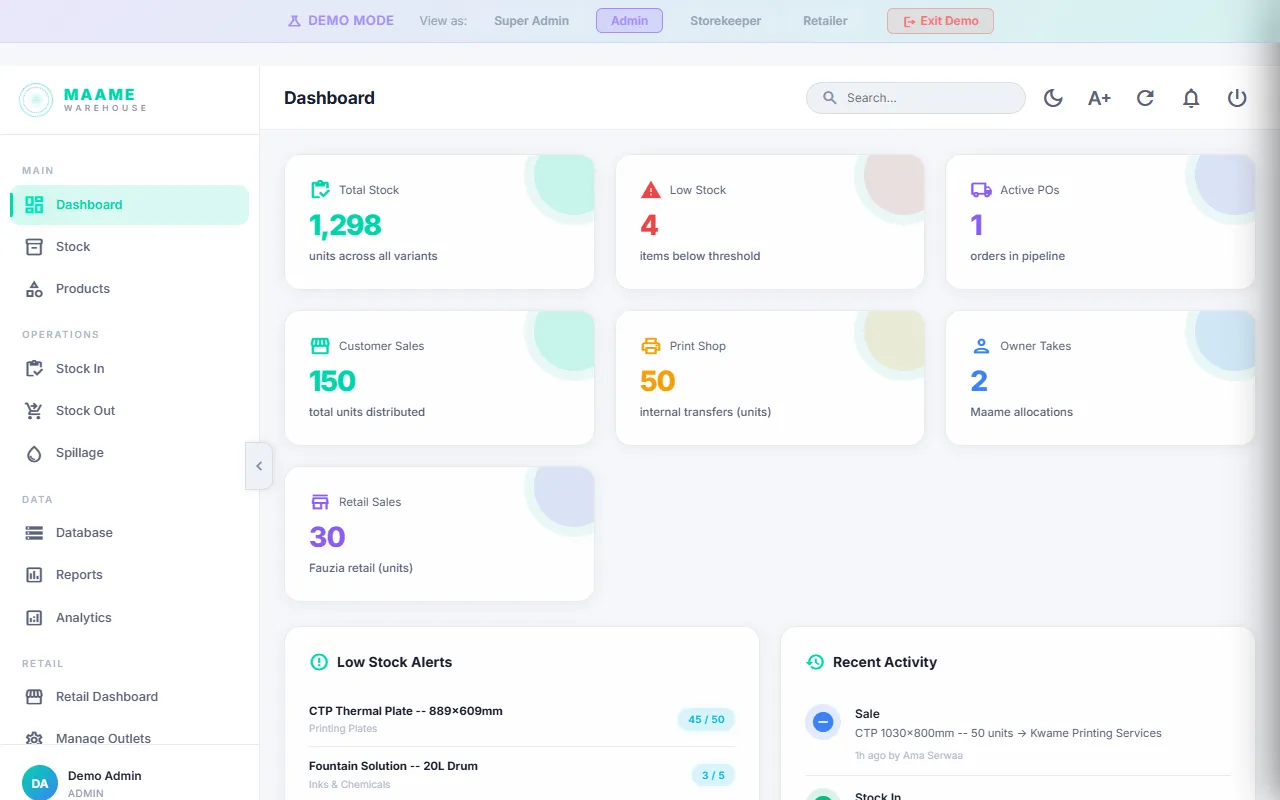
Maame Warehouse helps storekeepers and administrators track print supplies from receiving through warehouse issues and retailer activity. It gives a stock balance a movement history, so the team can ask where a quantity came from and where it went. Its companion PrintStore gives customers a separate way to browse supplies and submit order requests.
I built it because a stock number without a history has an extraordinary talent for becoming an argument. A carton arrives, some units are damaged and a retailer collects a supply. By lunchtime, everyone remembers a different balance and the spreadsheet has developed a personality. I would prefer my software to have records. One difficult personality per workstation is quite enough.
The product has two audiences and several kinds of responsibility. A storekeeper needs to record physical goods. An administrator needs the context of a supplier order. A retailer needs an outlet view. A customer needs a straightforward shop. They should share the relevant information without all being handed the same control panel and a prayer.
Answer “where did the stock go?” with a history
The central catalogue has categories, items and variants. Stock is calculated from signed ledger movements against the variant, rather than being treated as one unexplained number to overwrite.
A storekeeper records receiving or issuing goods with the quantity, transaction type, recipient context, operator and time. Notes and relevant prices add context where appropriate. Intake increases stock; issues and allocations reduce it. When someone investigates a balance, those entries give them a history to follow instead of an overwritten number and a room full of sincere witnesses.
That supports a more useful conversation. If somebody asks what happened to a variant, the system can point towards receipts, issues and other recorded movements. The ledger is an account of entered activity, not a magical substitute for counting the shelf, but it makes the question answerable.
Packaging is part of the same problem. A box, pack and individual unit do not always mean the same quantity. Conversion into base units keeps those operational choices connected to the stock calculation, while the interface can still use packaging language familiar to the person doing the work.
Receive the actual goods, not just the supplier's expectation
Direct Stock In lets a storekeeper or administrator select variants and record quantities. The interface can capture damage and notes as part of receiving. It sends the good-stock quantity through intake, then handles damage logging separately.
For the person receiving a delivery, this gives damage and usable stock their own place. There is an implementation limit to understand: intake and damage are separate writes, so they can succeed or fail separately. The input also rejects damage that consumes the entire entered receipt. I would need stronger transaction handling and a revised full-damage path before describing it as one all-or-nothing receiving operation.
Supplier purchases have a more detailed path. An administrator creates a purchase order with supplier, expected arrival and line items. The receiving view then separates the ordered quantity, the customs count and the local warehouse count.
That distinction is useful because the supplier's intention, an intermediate count and goods physically received are different observations. A customs shortfall can produce a loss record. The local count is the point that posts received stock into the ledger.
The visual stepper helps an operator move through those counts in sequence. One repair remains important: the server currently allows a local count without the customs prerequisite that the interface expects. I need to align those layers so the recorded comparison means the same thing whether the request arrives through the intended screen or another permitted route.

Receiving workflow: distinguish ordered goods, intermediate counts, local stock and separate damage records.
Record who received the goods
Stock Out connects variants and packaging quantities to an intended recipient. Customer sales require a recipient name, and the backend converts packaging, checks available stock and writes the negative movement with its context.
The current general-form wrapper accepts Customer and PrintShop destinations. Other labels exist deeper in the implementation, but I do not treat a visible Owner or Retailer option as an accepted route through that wrapper. Retail outlets have a separate request-and-acceptance journey.
For current use, the accepted general-form paths are therefore Customer and PrintShop, with retailer distribution handled separately. Aligning the other options across the interface and server is further work. Building this taught me to follow a choice all the way through processing: a convincing dropdown can otherwise become an exceptionally small dead end, which is a terrible destination for anyone carrying stock.
The useful capability here is accountable distribution: what variant, what quantity, which recipient and who recorded it. It is the information needed to investigate the balance later, not simply reduce a counter now.
Let an outlet manage the stock it actually accepted
A retailer account links to a customer record. It can request catalogue variants and quantities with notes, and the warehouse can prepare a distribution for that linked outlet.
Incoming distributions remain something to accept or reject. On acceptance, the server checks ownership, pending state and distribution type before checking stock and posting the warehouse allocation. A request to receive goods is not automatically the same event as accepting them.
The outlet's virtual stock comes from accepted warehouse allocations, less retailer sales and waste. Retail sales retain their own optional walk-in context, price, currency and notes. This gives the outlet a local working view without exposing the entire warehouse ledger as its daily workspace.
Multi-item processing still needs stronger failure handling. Current loops can write an earlier item before a later one fails, so they are not atomic all-or-nothing transactions. That is part of the next engineering work, alongside duplicate-variant and retry behaviour. A ledger can explain changes more clearly without making every possible batch failure disappear.

Retailer workflow: request, review the allocation, accept the relevant stock and record outlet activity.
Let customers shop without learning warehouse administration
PrintStore is the companion customer experience. Search, categories, product detail, cart, login, account and order tracking serve a different task from internal receiving and distribution.
Checkout collects the delivery or pickup choice and the relevant zone and contact details. Its payment choices include Mobile Money, bank transfer and cash on pickup where appropriate. Those choices describe the request; the traced order path begins with payment pending and does not perform processor settlement.
The service checks ordinary requested items against the available stock view, with a separate preorder flag. It records an order and its lines, then supports later status changes. That is not an inventory reservation: the order-status updater does not post stock movements by itself.
The current pricing path also uses submitted item prices, so authoritative server pricing is a further hardening requirement. I distinguish this storefront from the server-priced request systems elsewhere in my portfolio.
The customer journey is familiar: find a supply, choose a variant, assemble a request and follow its recorded status. The important expectation is that it begins as a pending request. Operational review, payment settlement and any stock movement have to follow their own accepted paths. A cart is good at collecting items; it cannot reserve a shelf through force of personality.

Customer workflow: browse, choose pickup or delivery and create a pending request.
Fit the workspace to the responsibility
The operations interface has role-filtered navigation, grouped work areas, a collapsible left rail and a top bar. Stock, purchase orders, waste, reports, retail activity and administrative surfaces have their own places. Right-side panels handle notifications and common forms.
The navy, teal and blue system can switch to a light theme, and the rail becomes an off-canvas menu on smaller screens. PrintStore has its own charcoal/white treatment, blue accent and mobile navigation for shopping and account tasks. The two interfaces are related without forcing a customer to learn a storekeeper's vocabulary.
I implemented the operations shell with Google Apps Script HTMLService, JavaScript, HTML and CSS, with Google Sheets records and Apps Script caching. The companion Vite frontend supports storefront and sign-in journeys. Role checks and server wrappers separate retailer, storekeeper and administrative authority.
Selected warehouse actions also have an offline draft queue. A saved draft is a proposed future write, not synchronised stock. That distinction is essential when the physical work continues while the network has chosen a quieter career.
What building around physical stock taught me
Maame Warehouse taught me to follow the identity of a quantity across different jobs. Ordered, counted, accepted, sold and requested are not alternative spellings of available. They each need a record, a role and a meaningful transition.
It also reinforced how much good software depends on agreement between layers. A stepper and server prerequisite need to match. Batch writes need explicit failure behaviour. A customer request needs a clear relationship to pricing, payment and inventory. The system makes those responsibilities visible enough to improve deliberately.
The engineering I enjoy here is making operational complexity usable: a storekeeper records a delivery, an administrator compares an order, a retailer accepts an allocation and a customer submits a request. Each sees an interface for their part of the work. The connected ledger explains the relationship between those actions, while the remaining pricing, batch-failure and prerequisite work is a defined development agenda.
Ask the history before arguing with the number
Maame Warehouse helps a team receive supplies, account for movements and connect warehouse work to outlet activity. PrintStore gives customers a suitable front door. Together, they make it easier to understand both the request coming in and the stock being handled behind it.
The balance may still need investigating. At least it can offer an account of its day before developing another personality.
Back to the story’s beginning ↑
About the work
Turning warehouse activity into a connected view of stock, orders and retailer relationships.
Stock movements, orders, retailer records and reporting connect through role-specific workspaces. The actively used system connects with PrintShop where inventory is shared.
Design and technical decisions
A central signed stock ledger is separate from the retailer sub-ledger derived from allocations, sales and waste. Google Apps Script and Sheets support operations, alongside a separate customer storefront. Shared inventory connects the workflow with PrintShop.