
Creative Tools · ICUNI Labs
MMMotion Graph
A motion-graphics studio for shaping layers, templates and frames into deliberate movement.
The build story 9 minute read

MMMotion Graph: Make the Motion, Then Keep It Editable
At a glance
- Purpose
- A motion-graphics studio for shaping layers, templates and frames into deliberate movement.
- The build
- A deterministic project/frame model underpins layers, a template Director and local or Ender export paths. Optional remote planning enriches the workflow without becoming a requirement for the authoring core.
In this story
By Menelek Makonnen · ICUNI Labs
MMMotion Graph helps creators make animated product stories, titles, diagrams and promos without giving up control of the finished composition. Start directly in Editor, reuse a design through Dials, or brief Director and compare treatments. The result stays editable in the same project.
That last part is personal. A finished animation is often followed by the words “one small change”, spoken by someone who has apparently brought a second personality to the review. If the result is only a flattened video, moving a title can become a reconstruction project with background music.
I built MMMotion Graph to make that change an edit. Text, shapes, media and motion remain parts I can inspect and adjust. Automation can offer the first direction; it does not get custody of the last metre.
A designer can build a precise title sequence. A small business can adapt a recurring product treatment. A creator can compare ways to explain an idea, then tune the timing around the actual footage and voice. Those are different starting points for the same continuing creative work.
Three ways into the same piece
The practical promise is simple: whichever entrance I use, I can keep working on the result. A title made through Director is still a title in Editor; a reusable Dials treatment still contains layers and properties. I built one shared project model to make that continuity possible.
That sounds technical until you try to revise something generated by another system. If the result arrives as a finished video, moving one title may require another generation or a separate reconstruction. If it arrives as ordinary text, shapes, media and animation inside the editor, the adjustment is an edit.
Underneath that continuity, a property can combine a static value, keyframes and an expression. Manual edits, Dials and Director all use those building blocks. Their changes retain their origin too, so a deliberate adjustment has a different meaning from an automated setting. That is how reuse can respect something I have already taken the trouble to fix.
For a product launch, that means I can ask for a first structure and still tune the hero line. For a recurring explainer, I can reuse controls without rebuilding every transition. For a title sequence, I can start directly on the canvas and remain there until the timing feels right.
The three routes are therefore working levels of control, rather than three products wearing the same coat.
Editor: be as particular as the frame requires
Editor is the direct route. It brings a layer stack, canvas, inspector, transport and timeline into a resizable workspace. Text, shapes, solids and imported media become authored parts of the composition. SVG artwork can enter as editable structure, and precompositions give related layers a home.
I can move a layer, change its properties, add keyframes and shape the motion. A drag previews the gesture, then commits it as a grouped change. Where a transform is animated, the edit can add a keyframe at the current frame; otherwise it changes the static value. Undo works at the level of the gesture, rather than asking me to reverse every tremor of a mouse.
That is useful when a piece is nearly right. A logo reveal may need less travel. A caption may need to hold through a spoken phrase. An explanatory line may need to arrive after the object it names, because reading ahead is a poor substitute for understanding the sequence.
Manual control is where those judgements become precise. I do not regard it as the emergency exit from automation. It is one of the main entrances.

Editor: refine the composition directly through layers, properties and frame timing.
Dials: reuse the useful decisions
Dials are curated templates with typed controls. A designer can change the intended parameters and see the composition respond, while regeneration respects protected human edits.
This is useful for repeated work. A lower third may need a different name and role. A title treatment may need a different pace or colour. A product card may need another image while retaining the spatial relationship that made the design work.
The distinction is between exposing a useful decision and exposing the entire machine. A duration control can be helpful. Requiring someone to negotiate with forty unrelated keyframes every time a job title changes is a rather elaborate form of hazing.
I can also save an authored design as a Dials template, carrying its selected layers, reachable precomposition dependencies and typed controls. That creates a route from a particular design to reusable structure. The result retains a graph the editor can work with; it does not need to flatten the design merely to make it repeatable.
This is one of the lessons I keep returning to: reuse should preserve the parts that matter and expose the parts intended to change. A template that forgets that distinction eventually becomes a photocopier with opinions.

Dials: control a reusable treatment while preserving authored choices. the large physical dial is a visual metaphor for typed parameters.
Director: give the piece a reason to exist
Director begins with intent. Its brief can describe the purpose, audience, problem, emotion and payoff, alongside duration, aspect, brand, media, soundtrack and narration. That context gives the system something more useful to organise than “make it cool”, a specification which has survived largely because nobody has found a unit for it.
The local planner works with a curated template catalogue. An optional Claude route can propose a plan, which is checked against the real catalogue, supported parameters and editorial rules. If that proposal fails, the built-in Director supplies the local planning route. Remote generation is an optional planning contribution, rather than the only door into the product.
Director can produce several styled takes for comparison. Those takes vary the treatment through choices such as type voice, palette, texture, motion and scene composition. They are staged for review and do not replace the active project simply because generation finished. Adoption is the explicit step that commits the chosen material and opens it for editing.
That is a useful loop for a product promo. I can bring a logo, screenshots, short footage and music, describe what the viewer should understand, inspect the directions, choose one and then deal with the particulars in Editor. A sequence that explains the wrong feature beautifully is still the wrong sequence. Comparison gives me something concrete to reject.
The same principle applies to a diagram or explainer. The ordering of information matters as much as the movement. Director's quality checks help constrain repeated treatments and weak structure; my judgement still decides whether the result explains the subject.
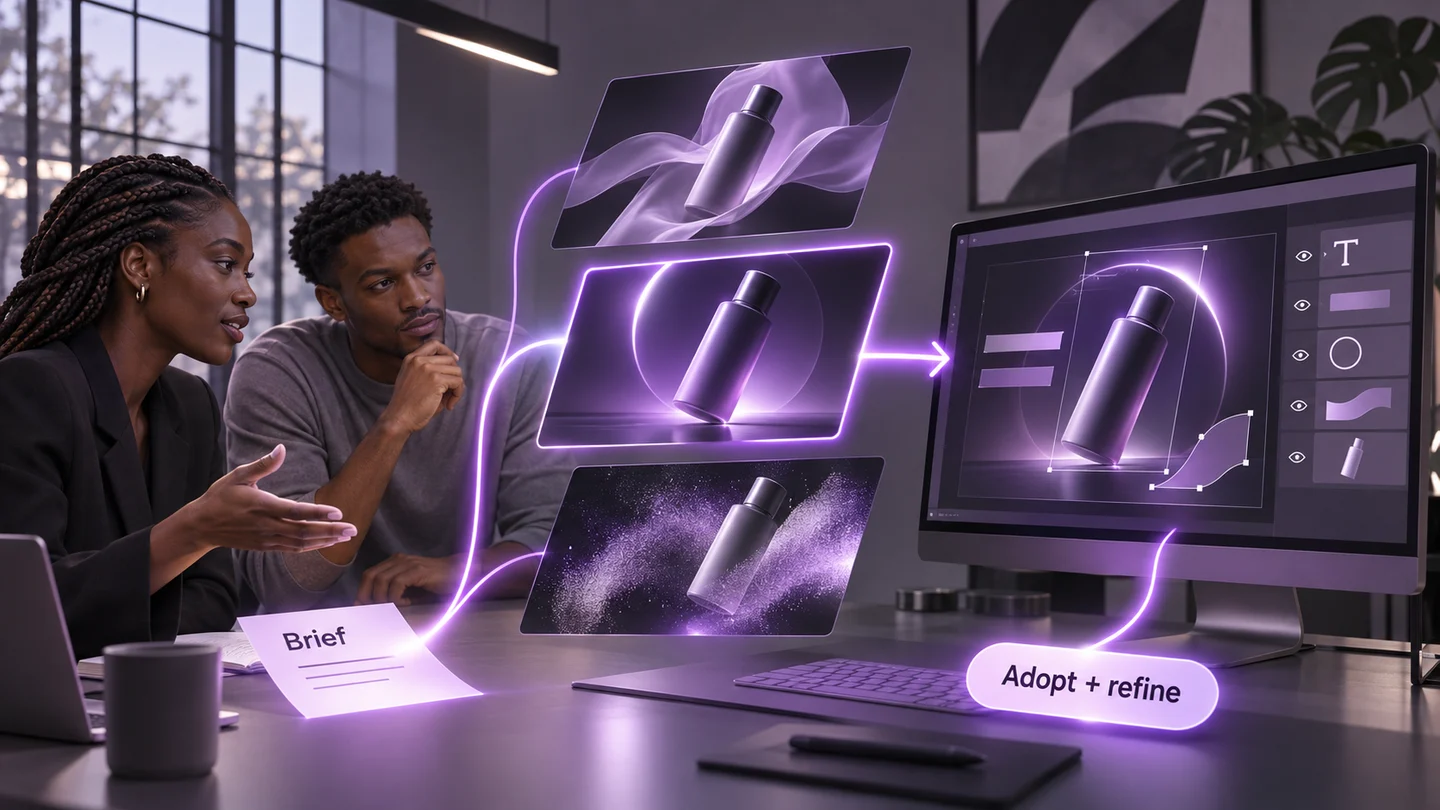
Director: brief, compare, adopt and refine. generated treatment options remain subject to editorial judgement.
Keep the sources in the conversation
Source media has its own decisions. Director can work with selected video windows, ordering, trimming, looping and playback changes. Soundtrack and narration are separate assets. Audio analysis can contribute rhythmic information, while bounded visual analysis can inform the treatment of images and video.
Those mechanisms serve a straightforward creative job: make the material work together. A product shot has a useful part. A narrated line has a duration. A soundtrack has energy and timing. Putting all three into a composition should retain their actual relationships.
I also care about what survives adoption. Guided source slots become ordinary media layers in the manual editor. The project should retain the source choices rather than leaving behind an attractive preview and a note saying the rest is somebody else's problem.
Save the decision, then render it
The project file is a versioned .mmg document. Loading runs migrations and structural checks, while revision-aware saving acknowledges the state actually captured. A separate recovery snapshot provides a route back to meaningful work after an interruption.
Preview and export begin from the same authored composition model through a shared compiler. The engine turns that model into rendering operations, including groups, transforms, masks, mattes, effects and blend scopes. The reason to share that starting point is consistency of intent: the project being edited is also the project being prepared for output.
Export preflight makes range, dimensions, missing media and unsupported operations visible before delivery. Depending on the selected route and supported capabilities, output includes video, PNG frames and audio. Ender is an optional rendering and encoding handoff with its own state. A queued handoff and a finished file remain different events.
I built those boundaries because creative software needs to be specific about failure. Missing audio should not quietly become a successful silent deliverable. An unavailable encoder should produce an intelligible result, rather than a file whose only motion is the editor reaching for a stress ball.
What the build taught me
MMMotion Graph uses TypeScript, React, Vite and an Electron desktop shell, with a separate core document/compiler layer and rendering engine. Its canvas-based output and WebCodecs paths serve the native motion model. The project does not need a remote planner to make the local authoring loop available.
The strongest part of the architecture is the connection between interfaces. A manual change, a dial adjustment and a Director-generated layer can remain legible as versions of the same operation. That makes history, recovery and continued editing easier to reason about.
It has also made me more demanding about automation. Producing something is the beginning of the responsibility. The tool should explain what it produced, preserve what the person changes and remain useful when the first answer needs work.
The revision belongs in the project
MMMotion Graph is useful when I need motion that can survive an actual working brief: create a first piece, compare a direction, reuse the good decisions and still make a precise change when the words, media or timing evolve.
Its three authoring routes reflect how creative work varies. Some days I know exactly what to draw. Other days I need a useful starting point. I built the connection between those modes so the project remains mine through both.
When “one small change” brings its second personality to the meeting, I can offer both of them an editable title.
Back to the story’s beginning ↑
Project details
A local-first authoring tool with a deterministic frame model, layer editor, template Director and local or Ender export paths. Remote AI planning is optional.
Design and technical decisions
A deterministic project/frame model underpins layers, a template Director and local or Ender export paths. Optional remote planning enriches the workflow without becoming a requirement for the authoring core.
Inside the workflow
A local-first authoring tool with a deterministic frame model, layer editor, template Director and local or Ender export paths. Remote AI planning is optional.
Have something in mind?
Bring the problem, the audience and what you want to make possible.
Discuss your project