
Creative Tools · ICUNI Labs
Ora
A personal operating desk that connects daily plans, capture and reflection.
The build story 8 minute read
Ora: Turn Scattered Thoughts into a Next Step You Choose
At a glance
- Purpose
- A personal operating desk that connects daily plans, capture and reflection.
- The build
- A desktop-first local workspace combines daily orchestration, capture, reviewable knowledge graphs and durable workflows.
In this story
By Menelek Makonnen · ICUNI Labs
A personal operating desk that keeps captured thoughts, suggested next steps, reviewed AI context and consequential actions in different states.
Ora helps you capture scattered thoughts, make sense of them and choose a practical next step without turning every fragment into a task. It brings notes, quests, daily context and reviewed assistance into a personal operating desk, so the material can arrive messy and still have somewhere useful to go.
A brain dump is an honest format. A plan, a worry, a reference and a passing idea can sit in the same paragraph, united mainly by their determination to arrive at the least convenient moment. Turn every sentence into a task and you have built a very efficient machine for manufacturing obligations.
I developed Ora to give that material a calmer route into action. Ora, or Oracle Aurora, grows from a LifeRPG foundation into a personal operating desk: notes, quests, daily context, reviewed assistance and workflow receipts connected by deliberate decisions.
For someone with ideas, reminders and unfinished intentions in several places, the benefit is a calmer route through them. Save the thought first, review its grouping, decide what deserves a quest and prepare work from the context you chose. Capturing is not a command to rearrange your life. I already generate enough obligations without giving punctuation hiring authority.
Capture without demanding a verdict
Brain Dump accepts pasted text and supported text, Markdown or JSON files, with native selection and an optional Google Doc import route. A source name gives the capture context. The owner can begin with the messy material instead of rewriting it into perfect tasks first.
Draft recovery is separate from processing. Browser drafts live in IndexedDB; the desktop has a native recovery file with an integrity check and temporary-file publication. Saving the draft is useful even before a graph, note, quest or action receipt exists.
That separation reduces the pressure of capture. You can preserve what you meant to bring in, then decide what to do with it. The inbox should not need an answer before agreeing to hold the question.
When processing begins, Ora retains the original source separately, fingerprints it and creates a queued record. The worker can then make progress without asking the interface to pretend that pressing the button completed the analysis.
Group the material before assigning the work
When you process a Brain Dump, related fragments can form threads you can inspect and trace back to the original passage. The primary path does this deterministically: it splits text into units, retains source offsets, classifies with explicit rules and builds a graph connecting source, sequence and concepts.
This is useful organisation without an invisible model call. Related fragments can form threads; the owner can inspect the raw units and the relationship back to the original.
The worker checkpoints progress and reconciles queued or interrupted processing on restart. Failed work can be retried while the preserved source remains available. Optional enrichment is a separate process with its own boundary; failure there can leave the local graph intact.
Cleanup is another review step. It prepares grouped material rather than committing new obligations. Quest suggestions require the ready source and current cleaned version, and they retain suggestion authority. Sensitive or non-actionable material can be skipped instead of being disguised as productivity.
That is a principle I wanted to protect. A memory may deserve preservation. A worry may deserve attention. Neither automatically needs a deadline and a checkbox. The task list already has enough applicants.

Capture and review: preserve the original, inspect the grouping and decide which material deserves a next step.
Ask for help with the context you chose
Ask Ora can use relevant local context and read-only connected Google context when the owner opts in. The interface shows the selected sources, sensitivity and coverage and gives exclusions a visible place.
The first send with private context selected prepares a local evidence preview. The owner can review that material before the subsequent send. The selection carries source identities, fingerprints and a digest of the evidence pack.
Before the provider call, the main process reselects and rechecks the exact documents. Changed or missing evidence requires another review. A consent decision about one set of notes should not silently apply to a different set because the search results changed while the window was open.
Connected-account context is checked against the active identity too. This makes the handoff more precise: these sources, from this account, for this request. It does not convert the provider into a local process. The desktop assistant uses configured remote provider APIs, and that sharing boundary remains explicit.
I value the extra review because context is powerful precisely when it is personal. “Make the answer relevant” should not become a blanket instruction to send whatever the application can find.
Know whether help is waiting, failed or still uncertain
The assistant records a pending turn before requesting a response, then records the result, cancellation or failure with provider and run context. Stale evidence stops the work before the provider is called.
Timeout handling needs the same care. Ora blocks an immediate retry while reconciliation is pending instead of allowing uncertainty to multiply into duplicate work.

Reviewed context: choose the evidence, check it again and keep remote sharing explicit.
See the day without mistaking missing information for free time
The daily desk brings local workflow history, opportunities, reminders, capacity, captured material and calendar information into one view. Connected Google information is optional. If a calendar read fails, local events remain available and the interface can report partial coverage.
That matters because a daily overview is a decision aid. An empty remote response, an unavailable connection and a verified absence of commitments should not all look like a wonderfully free afternoon.
From that view, the owner can ask for bounded drafting work: a local draft or evidence brief to review. The operation has its own identity and checks for active or uncertain duplicates. It does not quietly publish, purchase, submit or physically execute the plan. Preparation can save effort while leaving the consequential choice with the person.
Prepare the message, then decide whether it should go
For an external action such as a message, Ora can prepare the exact recipient and body against the selected account, freeze an approval preview and recheck the account and scope before execution. The send path uses a stable message identity and looks for an existing result before concluding what happened.
The lesson is broader than email. A draft, an approval and a confirmed external result are three different achievements. The product should be able to celebrate preparation without making a fictional claim of completion.
That gives the owner a meaningful handoff. Review the prepared artifact, decide whether it should proceed and inspect the receipt. It keeps the final authority visible even when the software can do substantial work around it.
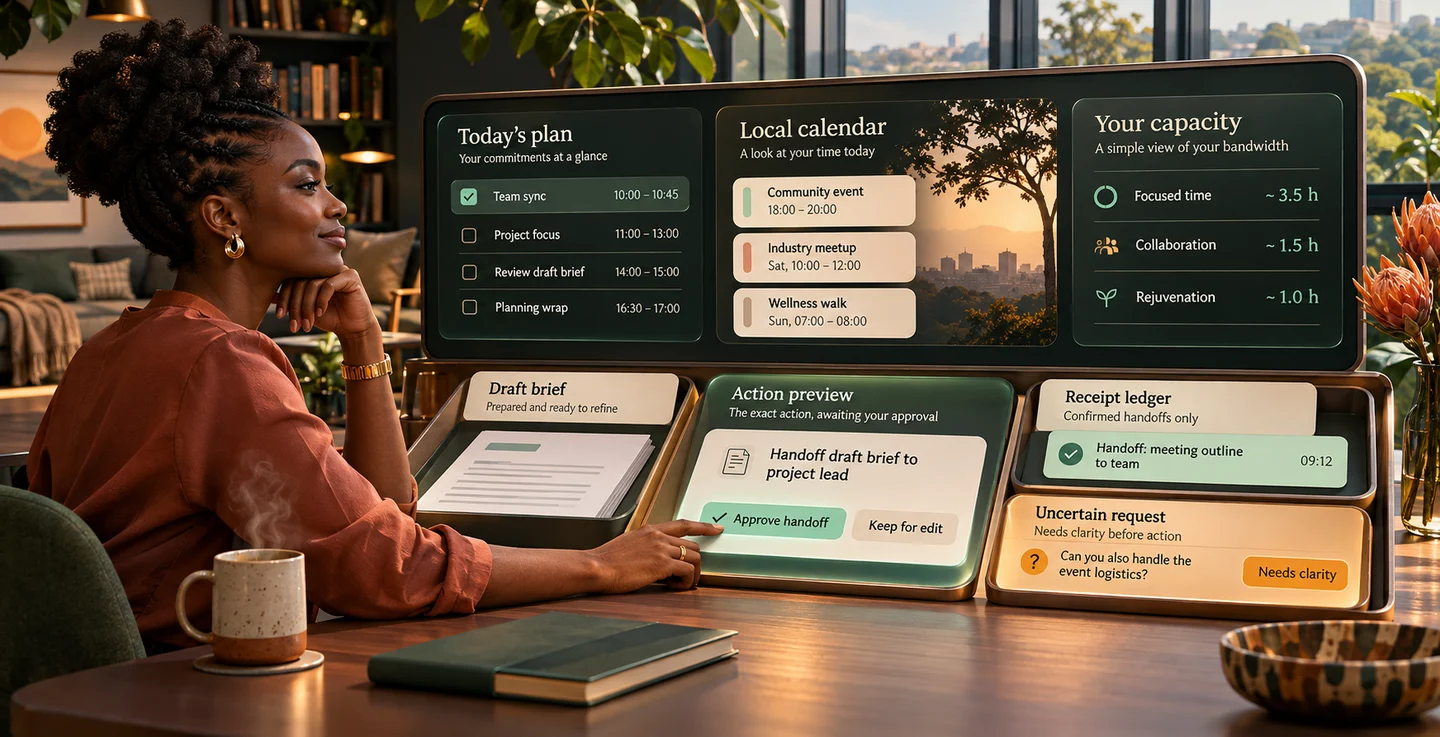
Daily work: understand the coverage, prepare the next artifact and distinguish approval from confirmed action.
The software behind the calmer desk
Ora uses TypeScript, React and Next.js with an Electron desktop runtime. SQLite supports native records and durable workflow state, while browser storage supports the web-side experience. Typed native boundaries connect the interface to local capabilities and configured providers.
The dark charcoal-green canvas, warm ivory type, amber focus and seafoam status give the operating desk a calmer visual rhythm. Resizable navigation and paired chat/browser drawers adapt the space to the current task. The details support attention rather than making every part of the interface compete to be an emergency.
The LifeRPG foundation remains useful through linked quests and progress. Ora adds value when the source, decision and outcome remain connected, so the owner can understand why something became a quest and what evidence supports its reported state.
There is also a deliberate provenance boundary around adopted capabilities and skill candidates. A description is not executable authority. the ability to discover a file should not quietly enable the powers described inside it.
What the build has sharpened
Ora has strengthened how I connect personal intent to durable software. I want to understand why an idea became a task, which notes informed an answer and whether an action actually happened. That requires the thought to stay linked to its source, the preview to the selected evidence and the action to its approval and receipt.
Those connections require work across interface state, local storage, background processing, identity and provider behaviour. They are where a helpful tool becomes explainable when something changes or fails.
The lesson is to make automation precise about what the person actually authorised. Useful assistance can reduce the work around a decision while leaving the decision recognisably theirs.
Ora: intent into reviewable next steps.
Let the thought arrive first
Ora gives a noisy stream of material a route towards clearer action without treating every fragment as a command. Capture it, inspect the structure, choose the context and review the next step. When work proceeds, keep its evidence and state visible.
The brain dump can remain honest. It does not need to become a perfectly organised life at the moment of arrival. Some thoughts need a task. Others only need somewhere to sit without being hired.
Back to the story’s beginning ↑
Project details
A desktop-first local workspace combines daily orchestration, capture, reviewable knowledge graphs and durable workflows.
Inside the workflow
A desktop-first local workspace combines daily orchestration, capture, reviewable knowledge graphs and durable workflows.
Have something in mind?
Bring the problem, the audience and what you want to make possible.
Discuss your project