
Business Systems · ICUNI Consult
VisaVista
Helping complex case preparation become a sequence of understandable, reviewable steps.
The build story 8 minute read

VisaVista: Know What Your Application Evidence Supports and What Still Needs Work
At a glance
- Purpose
- Helping complex case preparation become a sequence of understandable, reviewable steps.
- The build
- Adaptive intake connects document checks and scoped sponsor contributions. Approved drafts lead to a review-gated submission pack.
In this story
By Menelek Makonnen
VisaVista helps an applicant organise a coherent preparation case: answer the relevant questions, understand the resulting requirements, collect document versions and see which claims still lack support. It is a Ghana-first application-preparation workspace with scoped contributor handovers, editable letter drafts and a gated preparation-pack architecture.
A folder full of uploads does not explain why any file is there. An applicant may have several documents and still be unsure which requirement is unresolved. A sponsor may need to contribute one item without entering every part of the case. A reviewer needs to discuss the missing support, not divine the meaning of a reassuring percentage.
I built VisaVista to make that work visible and actionable. The person can follow the trail from answer to requirement to evidence and return to the part that needs attention. It prepares and organises; it does not predict a visa decision, submit to an authority or make current legal requirements true by drawing a very convincing progress ring.
Understand why the case is asking for a document
The guided intake is more than a sequence of questions. Saving an answer invokes deterministic requirement rules. When a rule applies, the system can create a checklist item with the question, answer, rule and claim context that produced it.
That makes a changing checklist explainable. If an answer changes, a requirement can become relevant, become irrelevant or return after being archived. VisaVista preserves that history through creation, reactivation and archival events rather than silently erasing yesterday’s logic.
For an applicant, the practical question is simple: why am I being asked for this? A useful workspace should be able to answer without pointing vaguely at its own intelligence.
The implementation uses React 19 and Vite, with a Google Apps Script backend and Drive and Sheets as the operational backbone. The rules in this path are configured predicates. They do not need an invented AI personality to be useful.
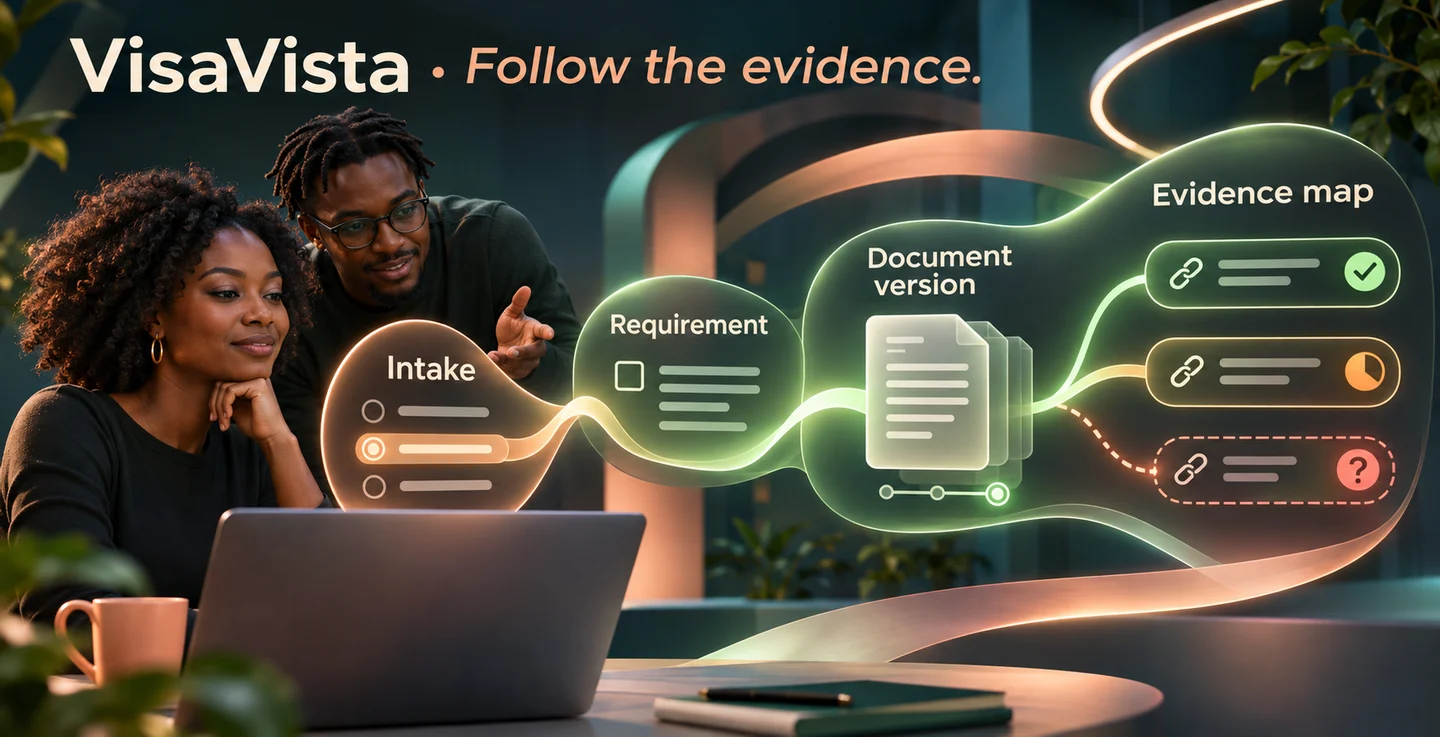
Know which document version supports the case today
The vault records explicit consent alongside document metadata, versions, retention information and content digests. A case-scoped upload checks the supported type, bounded size and readable name, then compares the declared byte count with the decoded content before creating the stored file.
The digest matters because two differently named files can contain the same bytes. Within a case, the same content produces a duplicate conflict. A replacement with the same name can become a later version, while earlier records become superseded.
This is the difference between collecting attachments and maintaining evidence. A reviewer needs to know which version supports the claim today. An applicant needs to replace a document without wondering whether the previous one has simply disappeared.
The quality pass adds mechanical checks: accessible storage, size agreement, recognised signature bytes and PDF signals such as end markers, encryption and page objects. Where an expected minimum page count exists, that expectation can be checked too.
Those signals have limits. They do not authenticate a document, establish that its typography is legible or decide that its contents satisfy current immigration requirements. Completeness and orientation still need human judgement. I would rather show a useful advisory than award a file a tiny digital halo.
See the gap between having a file and supporting a claim
A usable quality result is required before a document can be linked to a claim or checklist item. The evidence map then distinguishes supported, partial and missing coverage.
For the applicant, this turns a vague instruction to provide more evidence into a specific relationship to inspect. A file may be in the vault without supporting the claim in question. Another file may support only part of the story. Seeing supported, partial and missing coverage helps the person decide what to link, replace or ask about next.
The map makes those relationships available to act on. The applicant can link or unlink material, inspect gaps and return to the right document. The workflow does not require them to infer the meaning of a pile of uploads.
I also kept case states separate from document quality and checklist vocabulary. Building, needing attention, ready for review and pack prepared describe different preparation moments. None is an authority’s decision wearing a friendlier jacket.
Let a sponsor contribute the assigned evidence
A sponsor may need to contribute one piece of evidence. They should not need the applicant’s entire workspace to do it.
Sponsor invitations bind the contribution to an active invitation, a case and assigned checklist items. Uploads outside that assigned scope are rejected. The contribution uses the normal consent, document and quality pipeline before linking the result and recording the handover.
That gives collaboration a shape. It is a limited task with an identifiable destination rather than an informal request to send something somewhere and hope somebody files it correctly.
The workflow also has realistic failure handling. A failed link can trigger compensating cleanup, while a failed quality result can leave a stored item needing attention. I do not describe those separate Drive and Sheets operations as one magical transaction. Recovery has to deal with the state that actually exists.
Edit the letter and confirm the words you actually saved
The letter studio creates structured starter drafts with a snapshot of source facts. Applicants can edit them, but saving changed content resets the truth confirmation and returns the document to draft.
AI-assisted drafting is disabled in this version, as is the frontend’s human-review feature flag. The useful implemented story is editable, fact-supported preparation with an explicit owner of the words.
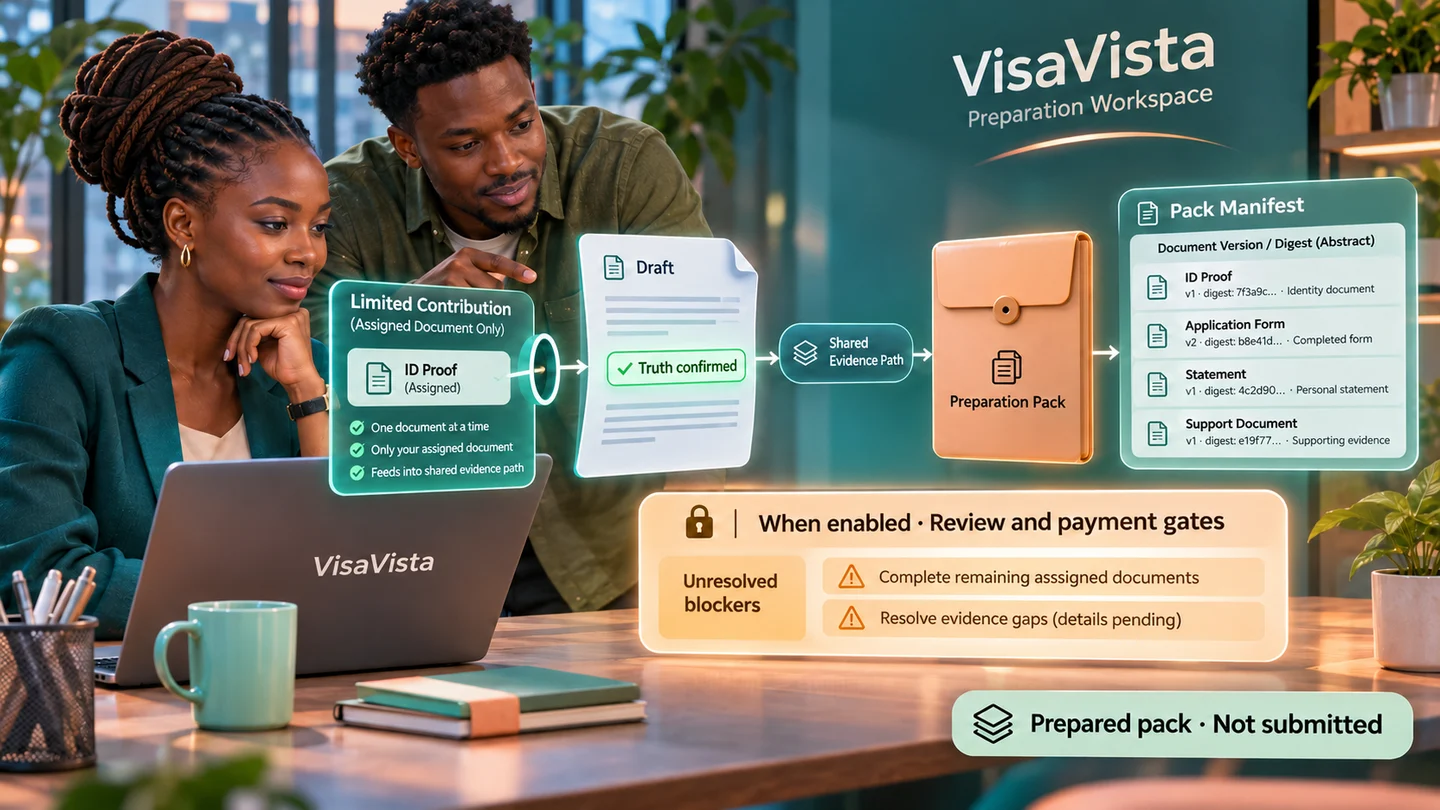
Review and payment gates are conditional service architecture.
Find the blockers before preparing the pack
The backend pack path brings the preparation work together. Its readiness checks include required checklist completion, active documents with passed quality checks, supported claims, approved truthful drafts, closed sponsor handovers, an approved latest review report, verified payment and the appropriate case state.
When a gate is blocked, the useful response is a list of concrete blockers. “Not ready” is a verdict. “This claim lacks support and this draft still contains a placeholder” is work somebody can do.
When configured gates permit preparation, the service copies evidence into a pack folder, writes approved letters as plain text and creates a manifest. Document versions, digests and review identities become part of the recorded output, alongside a checksum for the manifest.
Keep the case navigable while attention moves between tasks
VisaVista uses deep blue-green surfaces, peach, mint, coral and violet, with Inter and a real V-and-route SVG identity. The navigation rail can be dragged within bounded widths or collapsed, and the preference persists locally. Mobile navigation gives the same case workspace a more compact route through the work.
Those details support the central job: keeping a complicated case navigable. A person should be able to move from an overview into the relevant evidence, then back to the question it answers, without losing their place.
The reversible demo makes the preparation model approachable with synthetic data. Live mode has a different responsibility: validate the saved session, load the scoped dashboard and expose retry or sign-out when loading fails. A populated demo is not a receipt for a live backend.
What building the preparation chain taught me
The most useful design choice was to keep the chain visible. An answer has consequences. A document has a version. A claim has support, partial support or a gap. A draft has an owner who confirms its truth. A prepared pack has an identifiable manifest.
An applicant can identify the next missing item, a sponsor can understand their limited contribution and a reviewer can point to the exact unresolved claim or draft. That is the user value I want from the chain: a shared basis for the next conversation, with less effort spent reconstructing why the case looks the way it does.
Leave the applicant with a clearer next task
VisaVista is for someone preparing an application who needs to understand the relationship between their answers, documents and claims. It gives contributors and reviewers a way to work on specific gaps without treating a pile of files as a complete argument.
Qualified current legal validation, sensitive-data controls and live service acceptance remain necessary before production claims. The aim is a better preparation process within that boundary. A folder can keep being reassuring; I built the workspace so it can also answer when somebody asks what is actually inside.
Back to the story’s beginning ↑Project details
Adaptive intake, document checks, evidence claims and scoped sponsor contributions lead to approved drafts and review-gated submission packs.
Design and technical decisions
Adaptive intake connects document checks and scoped sponsor contributions. Approved drafts lead to a review-gated submission pack.
Inside the workflow
Adaptive intake, document checks, evidence claims and scoped sponsor contributions lead to approved drafts and review-gated submission packs.
Have something in mind?
Bring the problem, the audience and what you want to make possible.
Discuss your project