Creative Tools · ICUNI Labs
Edia Pro
Bringing source-aware edit planning into the editor filmmakers already use.
The build story 8 minute read

Edia Pro: Explore a Different Cut Without Starting Over
At a glance
- Purpose
- Bringing source-aware edit planning into the editor filmmakers already use.
- The build
- A Premiere Pro CEP panel plans source-aware cuts and applies reversible edits through ExtendScript. Shared edit files import into isolated sequences, followed by readback checks rather than assuming the edit succeeded.
In this story
By Menelek Makonnen · ICUNI Labs
Edia Pro helps Premiere Pro editors try different rhythms, clip orders and cutdowns while protecting the moments they want to keep. It is a dockable panel for local, seeded editing experiments, with controls for scope, duration, linked material and repeatable choices.
A montage may feel flat even though every shot is good. I can ask for shorter cuts, change the order around protected anchors or explore a different pacing curve, then inspect the result in Premiere. When the interesting version appears, its seed gives me a way to repeat the experiment instead of trying to summon yesterday's accident.
I built Edia because chance can be creatively useful and administratively feral. “Make it less predictable” is a reasonable note. “Bring back the unpredictable version from twenty minutes ago” deserves a better answer than a spiritual exercise.
The engines run algorithmically, without an LLM deciding what the film means. They offer a structured way to explore. I still choose the version that works, and a separate MMM Edit import route can reconstruct supported edits from elsewhere into Premiere.
Put the boundaries around the experiment
I start by choosing a sequence. Edia reads its video and audio track items, frame rate and available range into a working mirror. The panel pairs parameter controls with a searchable timeline inspector, so the operation has a visible subject rather than an abstract promise to improve everything.
Scope can mean the whole sequence, selected clips, particular tracks or an In/Out window. That gives me practical ways to ask smaller questions. Can this montage become sharper? Can the middle section breathe? What happens if I vary the B-roll while retaining the dialogue structure?
Locks protect chosen moments. First/last protection can hold the ordered opening and ending in place, including linked groups. Linked audio and video handling matters because a more exciting picture sequence is a poor bargain if its sound arrives separately with a grievance.
Protecting a moment also means protecting the correct use of it. A shot may appear three times, and I may want only the last appearance to stay fixed. Edia targets Premiere’s TrackItem identity for that instance instead of assuming the source file identifies every use. That lets a creative instruction remain attached to the moment I actually meant.
Locks and history are associated with the project and sequence. If an item cannot be tracked reliably, the panel warns about persistence instead of implying the protection has survived. That makes identity part of the editing experience, not just a database concern hidden below it.
Make variation repeatable
The seed gives an experiment an address. With the same starting material, parameters and seed, the local engine can compute the same choices again. Reroll asks a new question; replay repeats the earlier one.
Trim combines intensity, minimum and maximum durations, head/tail/both selection and a weighting toward shorter, even or longer cuts. It considers available source material and snaps the result to frames. Optional BPM adds a beat reference, followed by further bounds checking.
For a music-led product montage, I can explore shorter cuts while keeping a hero reveal protected. For a slower sequence, a longer weighting can offer a different set of durations without converting the piece into an involuntary trailer. The parameters narrow the possibility space enough to make comparison useful.
Beat Cut introduces pacing curves such as Even, Build-up, Breathe and Pulse. It chooses beat lengths according to the clip’s position in the sequence, respects available source frames and repacks the result. The Edit Generator combines style choices with optional Pendulum or A–B–A structure. These are starting points for editorial judgement, rather than a declaration that a preset understands the film.

Multi-clip exploration: choose a scope, protect important moments and compare a repeatable variation.
Separate the plan from the action
I wanted experimentation to remain understandable when an edit is partly applied or the host disagrees. React and JavaScript provide the panel, local engines calculate the proposed EditPlan, and an ExtendScript adapter through Adobe’s CSInterface bridge applies it in Premiere. Keeping those stages separate gives the result a way back into the actual timeline rather than leaving the panel admiring its own intentions.
That separation makes the creative logic easier to reason about. A duration calculation does not need to know how a docked panel looks. A host mutation should not depend on which button colour persuaded me to press it.
Before an ordinary multi-clip change, the adapter resolves targets and snapshots reversible fields. A stale stable identity causes a refusal rather than a hopeful edit to whatever happens to occupy the old position. The panel sends bounded batches and prepares compensation before beginning a multi-batch operation.
If a later batch fails, earlier accepted batches have a reverse path. Shapes that cannot be compensated safely across batches are refused. Those details matter on a long sequence: a partial edit is still an edit, even when the final dialog would prefer to call the whole attempt a failure.
After an attempted commit, Edia reads Premiere again and reconciles the mirror. The display should reflect what the host now contains, rather than continue admiring the intended plan. Failed commits also lead to a fresh read.
History follows the same principle. Undo and “revert to here” inspect the inverse first and update their stack after host acceptance. Operations that change clip positions or identities require another scan. Reversibility is a relationship with the host, rather than a decorative arrow pointing left.
Explore one source in a new sequence
Single-source split is a different creative question. Instead of varying an existing multi-clip arrangement, it takes the first video clip as the master source and creates a separate sequence of chosen windows.
I set a target duration, segment count and seed phrase. The engine distributes durations, caps each segment against source availability and chooses source windows. It advances an integer-tick cursor to keep accumulated timing from drifting through repeated floating-point additions.
The host creates a source-matched sequence and places the generated segments there. The original sequence is not the destination of those inserts. Failed construction has a cleanup path for the generated sequence.
That is useful for trying a cutdown from a longer visual source: a performance, a process shot or an experimental generated passage. Repeated source windows can be part of the result. The tool is selecting segments, not manufacturing new coverage that the camera never captured.

Single-source split: explore a new arrangement while keeping the original sequence separate.
Carry an edit between tools honestly
Edia also accepts shared MMM Edit documents, including the .mmmedit format and supported legacy JSON. That makes it part of a wider workflow: an edit assembled elsewhere can be reconstructed in Premiere rather than reduced immediately to a flattened video.
The importer validates the document, frame rate and clip ranges, then maps frames into Premiere ticks. Before building, it classifies features as native, approximate or unsupported. Trim, constant speed and track placement have different transfer expectations from effects or reverse playback.
I want that report before the editor starts trusting the result. A timeline that opens successfully can still express a different edit. Approximation deserves a label and a decision, not an optimistic change of subject.
Construction happens in a staging sequence cloned from the active sequence. Unique media paths are imported, clips and markers are placed, and a failed placement leads to rejection and attempted staging cleanup. The destination remains a separate reconstruction rather than a silent rewrite of the working sequence.
After a committed build, Edia compares a new read of the sequence with the expected media paths, tracks, timeline/source ranges and frame rate. Its receipt distinguishes rejection, a committed result without verified readback and an applied result that matched the checks. Those distinctions make a handoff more informative than a single green badge.
The optional local handoff bridge carries versioned source, target, request identity and approval state. It also handles repeated request identities. Its approval field is part of the application contract; it does not become a signed identity merely because the message stays on localhost.
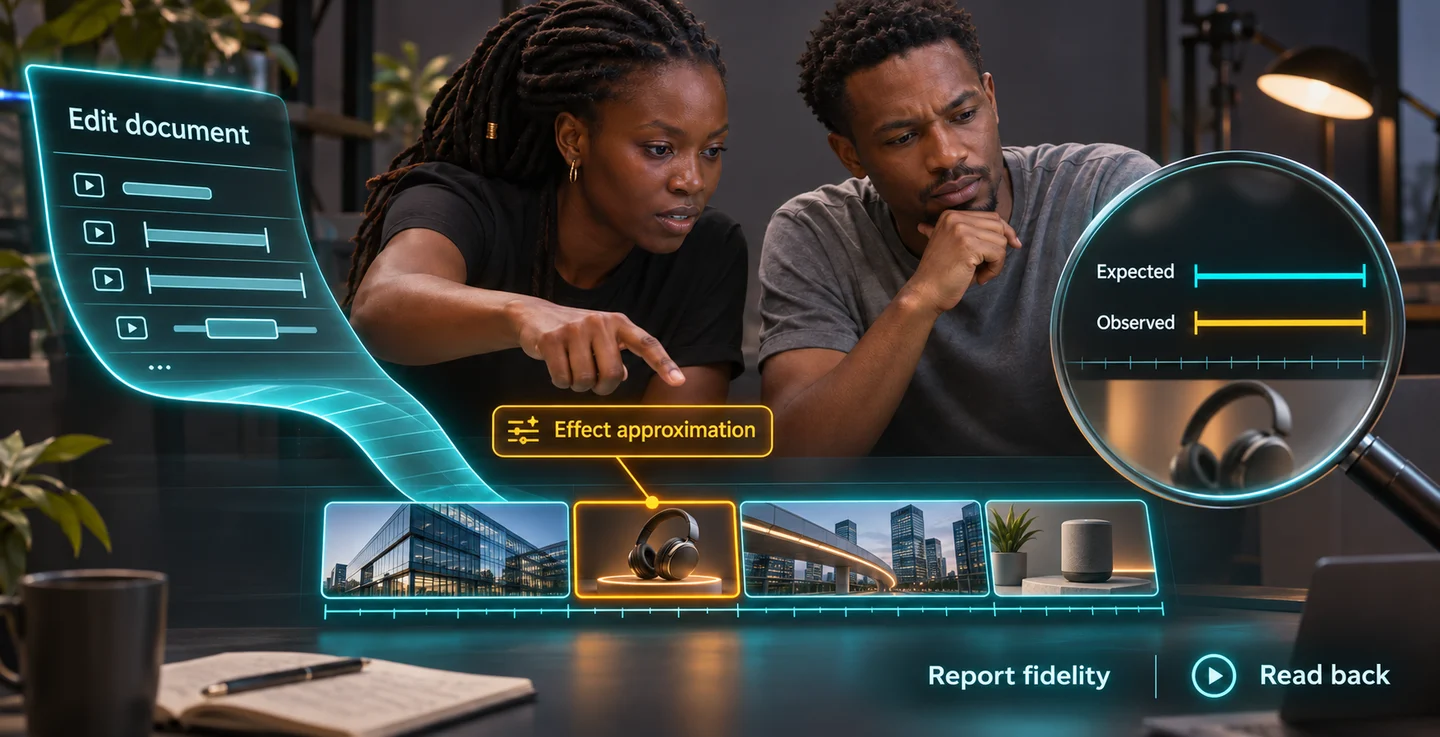
MMM Edit handoff: disclose fidelity, stage the sequence and compare the host result.
What this taught me about creative tools
The most interesting challenge was keeping experimentation and accountability in the same design. A seed makes chance repeatable. A scope makes it intentional. Stable instance identity makes it targetable. Readback gives the interface a chance to discover that reality disagrees.
It also sharpened how I design product boundaries. Edia Pro is a panel-led editing tool; Edia Pro MCP is a separate route for an AI client to request host operations. Sharing the Premiere context does not make their interfaces, transports or responsibilities identical.
The strength I bring here is joining creative intent to explicit technical contracts. Rhythm and reversibility belong in the same conversation. A tool that encourages bold choices should also make it easier to understand the choices it actually applied.

Keep the experiment worth repeating
Edia Pro gives an editor several practical ways to unstick a cut: vary a selected montage, protect its anchors, try a source cutdown in a separate sequence or reconstruct a supported edit document for further work in Premiere.
Building it brought rhythm and reversibility into the same design problem. If I encourage an editor to try something bolder, I also want them to understand what changed and be able to return to the useful version.
Chance can keep its creative instincts. I have supplied a filing system and a repeat button.
Back to the story’s beginning ↑
Project details
An Adobe Premiere Pro panel plans cuts, applies reversible edits and imports shared edit files into isolated sequences with readback checks.
Part of the Edia family. Related versions and implementations have their own entries.
Design and technical decisions
A Premiere Pro CEP panel plans source-aware cuts and applies reversible edits through ExtendScript. Shared edit files import into isolated sequences, followed by readback checks rather than assuming the edit succeeded.
Inside the workflow
An Adobe Premiere Pro panel plans cuts, applies reversible edits and imports shared edit files into isolated sequences with readback checks.
Related work
Have something in mind?
Bring the problem, the audience and what you want to make possible.
Discuss your project