
Creative Tools · ICUNI Labs
Edia Pro MCP
Connecting controlled automation to Premiere while keeping editing actions inspectable.
The build story 8 minute read

Edia Pro MCP: Work with an AI Assistant Inside Your Premiere Workflow
At a glance
- Purpose
- Connecting controlled automation to Premiere while keeping editing actions inspectable.
- The build
- A local MCP gateway bridges capability-gated editing operations to Premiere Pro through a CEP bridge. Diagnostics and metadata-only media previews remain distinct from permission to execute an editing command.
In this story
By Menelek Makonnen · ICUNI Labs
Edia Pro MCP lets a configured AI client work with a local Premiere Pro session through discoverable inspection and editing tools. A creator can ask the client to examine the timeline, request a supported change or preview newly arrived media, while Premiere remains the editing host.
It is useful when the planning conversation happens in one tool and the actual sequence lives in another. I want the assistant to reach the work I am discussing, rather than send me back with a beautifully formatted list of manual chores. I also want a trim to affect the right clip in the right project. These are modest ambitions until two clients start volunteering simultaneously.
I built the local integration around a shared service, a CEP connector and capability-specific permissions. The model belongs to the MCP client; Edia supplies the bridge and the return path from the host.
That return path matters to the person doing the editing. If Premiere is busy, a request is unsupported or an outcome is uncertain, the next step should be clear. An assistant's confident “done” is a surprisingly poor substitute for looking at the timeline.
Put one local service behind the clients
A creator may work with more than one AI client. Giving each client its own uncoordinated connection to the same Premiere session would turn a shared timeline into a very expensive group chat.
Edia uses a lightweight stdio gateway for the client-facing Model Context Protocol connection. The gateway starts or joins one authenticated local service, then carries MCP messages over a loopback connection. The service owns the shared bridge state and coordinates host work.
That arrangement gives concurrent clients a common point of control. They do not each launch another Premiere bridge and independently assume they own the next edit. A shared host lease serializes the relevant workflow.
The connection authenticates through a nonce-based HMAC exchange using protected local configuration. Startup checks distinguish a compatible service from a stale build. Message framing is bounded, and malformed input can close the offending client connection instead of expanding into an unlimited parsing exercise.
The technical stack is TypeScript and Node.js, the MCP SDK, schema validation and a CEP connector that reaches ExtendScript. The file protocol between service and connector is deliberately local. Model inference stays with the client that is asking for work.
Show readiness without opening the project’s diary
The Premiere panel is compact: bridge status, Connection Center, bridge-directory configuration, Start/Stop controls, update controls and an Activity log. Its charcoal and violet identity belongs to a connection tool, rather than a second full editing application squeezed into the corner.
The connector emits a heartbeat containing protocol and schema information plus waiting/running state. The service checks liveness before dispatch. A missing or stale heartbeat leads to reconnect guidance.
That creates a better distinction than “the process exists, therefore the editor is ready.” A running application and a functioning command bridge are separate facts. The latter needs a fresh answer from the part that actually handles commands.
A hidden CEP instance can maintain the connection when the visible panel is closed. Commands are claimed through atomic file renaming so the visible and hidden instances cannot both treat the same request as their personal assignment.
Build on upstream work with the credits intact
Edia retains two pinned MIT upstream tool registries: leancoderkavy’s premiere-pro-mcp and hetpatel-11’s Adobe_Premiere_Pro_MCP. Their retained catalogs are part of the product’s lineage, not a collection of native operations I claim to have invented from nothing.
My contribution is the integration around them: one authenticated service, separate connector identity, shared coordination, capability gates, diagnostics, input adaptation and explicit mutation outcomes. Provenance pins the upstream revisions and preserves their notices.
The secondary registry keeps an hp_ prefix. Where names overlap, different schemas and semantics remain visible instead of being flattened into an apparently universal command. Search, schema inspection and invocation give the client a way to discover the particular operation it intends to use.
Edia also adds bounded host reflection, connection/provenance inspection and a read-only command-dispatch probe. Reflection returns member names and signatures from allowlisted objects; it does not invoke each discovered method to see what explodes. That would be an unusually destructive way to read the contents page.
The packaged shortcut inventory is similarly a discovery aid. Experimental QE surfaces remain host-dependent, and the active product uses CEP rather than an assumed UXP backend.
Let a trim demonstrate the contract
Suppose I want to shorten a clip while working through an edit with an assistant. The useful workflow is to inspect the target, describe the change, grant the appropriate permission and check what Premiere actually contains afterwards. A trim is small enough to explain, but important enough to show why the connection needs more than a command launcher.
The client discovers the operation and inspects its schema. Arguments are checked for forbidden NUL characters, compatible spellings and number representations are normalized, and schema validation returns useful field errors. The trim contract rejects conflicting out-point and duration instructions.
Permission is checked before dispatch. An optional expected-project guard can reject a mismatch before mutation, while shared coordination keeps the workflow from colliding with another client’s host work.
At the host, the trim handler captures previous clip values, applies the request and reads state back. A mismatch leads to rollback attempts and a structured result containing attempted, observed and restored values, including errors when relevant.
This makes the response useful to the next decision. If the write was accepted but no confirming readback exists, that is a different state from a verified result. If dispatch happened and communication was lost, the caller should inspect the timeline before trying again.
Blind retry is particularly unhelpful when the first request may have worked. “Do it again” can become a second edit, and the confidence of the retry does nothing to improve its timing.
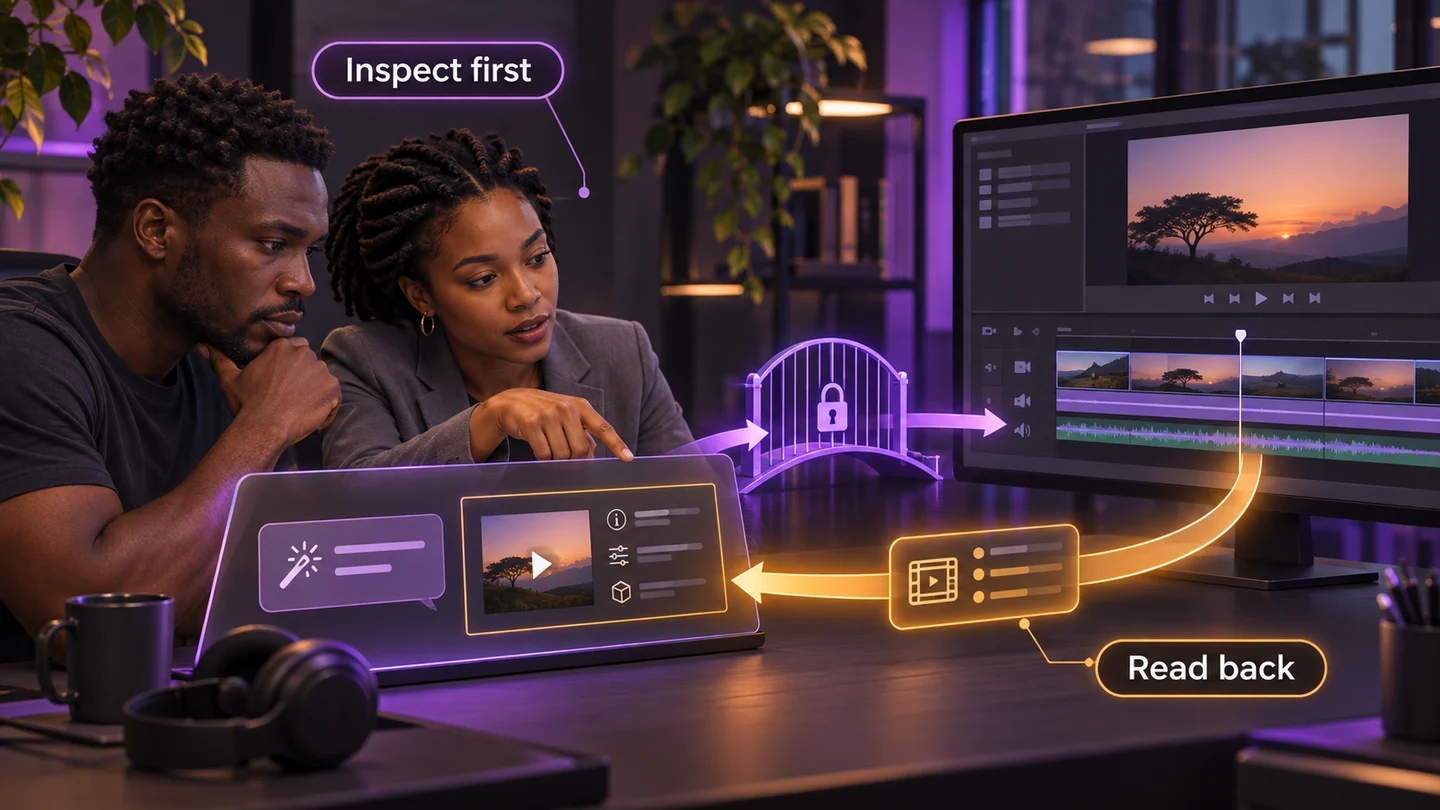
Request, execute and inspect: a tool response needs an appropriate host check.
Treat uncertainty as useful information
While that work runs, I need to distinguish a busy editor from a lost connection. The bridge stages command and response files and uses busy markers to identify an active operation. Waiting has a hard bound. That makes an interruption actionable instead of turning “almost finished” into a permanent subscription.
When a timeout happens after dispatch, the system reports an unknown mutation outcome with recovery guidance. That is an operationally useful answer. It tells the client to look at the host before deciding whether another write is appropriate.
Capabilities separate inspection, editing, export, filesystem work and unsafe scripting. Caller-authored scripts and unrestricted expression execution require explicit unsafe-script configuration rather than arriving as an incidental consequence of enabling ordinary inspection.
The catalog can therefore describe more than the current authority allows. Registration, permission and native acceptance each answer a different question. Keeping those answers separate makes the system easier to operate when a particular tool is unavailable or a host build behaves differently.
Preview incoming media before importing it
The watched-folder workflow gives the bridge a different kind of job. A creator may have new footage arriving in a local project folder and want to know what changed before adding it to Premiere.
The watcher starts with an approved workspace, a contained path, allowed extensions and optional recursion or target bin. It records a session baseline and compares bounded metadata such as relative paths, sizes and modification times. It is not analysing the contents of every video.
A fresh preview returns a proposal with a plan digest, counts and scan-limit information. Paths are redacted by default, with full-path disclosure requiring an explicit option. The preview says applied:false and does not automatically import the media.
For an assistant-supported edit, that creates a useful conversation: these are the new candidates; these are the scan’s limits; this is the proposed next action. New files appearing on disk do not acquire an automatic invitation to the project.

Watched-media preview: propose changes before import and keep incomplete scans visible.
What I wanted the integration to teach
Edia Pro MCP is separate from my Edia Pro editing panel. The panel gives an editor direct controls for seeded plans and reconstruction. The MCP product gives a client a guarded way to request native host work. Their shared context is Premiere; their product contracts are different.
Building the bridge strengthened my approach to systems integration: preserve upstream provenance, define the process boundary, serialize shared mutations and give uncertain outcomes an honest recovery path. The glamorous part may be the assistant’s instruction. The useful engineering is often the return journey.
It is also a creative-tool lesson. Editors need automation that respects the project’s actual state, especially when the state differs from what the client expected. A precise refusal or an instruction to inspect can save more work than an enthusiastic but unverifiable completion message.
Keep the conversation connected to the cut
Edia Pro MCP is useful when an assistant can help with the work in Premiere rather than merely talk about it: inspect a session, discover a supported operation, request a change and understand the host's answer. Shared coordination and explicit permissions keep multiple clients from treating the same timeline as their private notebook.
My contribution sits around credited upstream registries: connection management, adaptation, capability boundaries, diagnostics and a clearer account of what happened. Integrating other people's useful work responsibly is part of building a useful product.
I want less clerical shuttling between the conversation and the cut. I would also like the cut to remain entitled to disagree.
Back to the story’s beginning ↑
Project details
A local MCP gateway for Adobe Premiere Pro provides capability-gated editing tools, diagnostics and metadata-only watched-media previews through a CEP bridge.
Part of the Edia family. Related versions and implementations have their own entries.
Design and technical decisions
A local MCP gateway bridges capability-gated editing operations to Premiere Pro through a CEP bridge. Diagnostics and metadata-only media previews remain distinct from permission to execute an editing command.
Inside the workflow
A local MCP gateway for Adobe Premiere Pro provides capability-gated editing tools, diagnostics and metadata-only watched-media previews through a CEP bridge.
Related work
Have something in mind?
Bring the problem, the audience and what you want to make possible.
Discuss your project