
Business Systems · ICUNI Consult
PopOut Studios PrintFlow
Connecting a public print storefront to the people and stages behind the job.
The build story 6 minute read

PopOut Studios PrintFlow: Carry the Customer’s Print Request onto the Production Floor
At a glance
- Purpose
- Connecting a public print storefront to the people and stages behind the job.
- The build
- A shared customer storefront and staff workspace connect pipeline stages with a configurable Operations Hub, maintenance tickets, automation configuration and quota-health controls. This remains a distinct implementation from the experimental dashboard.
In this story
By Menelek Makonnen
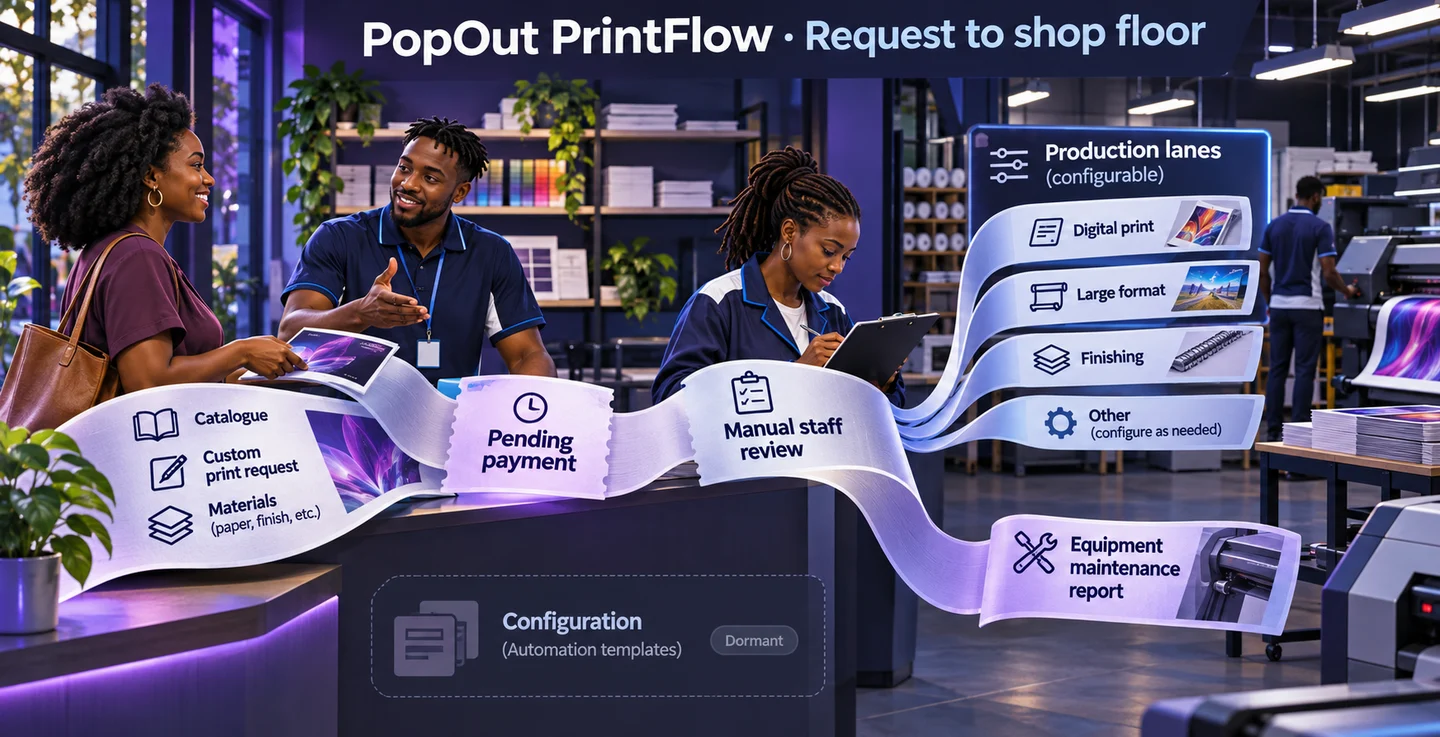
The PopOut Studios branch of PrintFlow helps a print team follow a request from the customer's specifications into staff review and production. It brings the requested item, artwork, payment state, production destination and maintenance problems into one operational picture so the next person has more of the context they need.
A customer can know exactly what they want while the floor receives only part of the story. Someone has the artwork. Someone remembers the finish. Payment is “being sorted”, an expression with suspiciously flexible office hours. Then the printer decides it would like a problem record of its own.
I developed this branch around that handover. It builds on the shared PrintFlow family's storefront and job-management foundations, with configurable production lanes, maintenance reporting, summaries and integration controls as its particular direction. The value is helping a shop understand where work belongs and what is holding it up, not inventing an unrelated platform with the same surname.
Keep the specification and artwork with the request
The storefront supports catalogue choices and custom print requests. A customer can describe the item, select quantities and materials, and include artwork or design and delivery notes. Those details belong together because they define the work that staff will eventually need to assess.
The public journey performs local checks before creating the request. The server accepts the submitted total into a pending-payment job. That is a useful intake record, but it is not a payment-provider checkout or a complete delivery-pricing engine. In this version, the delivery fee remains zero in that path.
I keep that boundary explicit because “order placed” can conceal several unfinished conversations. Has the artwork been checked? Is the requested finish practical? Has someone actually accepted the payment? A staff handover should make those questions easier to answer rather than burying them under a success animation.
Carry the shared job journey into this branch
PrintFlow’s branches share important foundations, including the storefront, product handling, staff views and familiar job states. PopOut did not arrive as an unrelated platform that happened to acquire the same surname.
The inherited job lifecycle moves through pending payment, approval, production, finishing and completion. Traditional handlers use expected-state and role checks, helping prevent an action from being applied to a job whose state has already changed.
That family foundation gave me a consistent operational vocabulary to extend. Instead of inventing a new definition of “in progress” for another shop interface, I could concentrate on how this branch organises the floor around it.
The application uses Next.js 16 and React 19 with JavaScript, supported by Google Apps Script backend modules. That combination keeps the public and staff experiences close while giving the operational records their own server-side responsibilities.
Arrange the board around the way the shop works
The Operations Hub adds configurable stages with role access, service-level settings, ordering and enablement. A team can arrange a board around its production process rather than squeezing every department into one fixed presentation.
The interface supports adjacent stage movement through tap and swipe interactions. That makes the board approachable in a busy environment, where a quick action may be more useful than a dense form.
There is an important implementation lesson underneath it. An interface can guide somebody through adjacent stages while the server enforces a narrower rule. The current board endpoint checks destination and role permission; it does not apply the same source-state or adjacency guard as the stronger traditional job handlers. Those contracts need alignment before treating the board as an equally strict workflow gate.
The movement records still provide useful operational context: actor, origin, destination and time. The result is a developing account of how work moved, rather than a board that forgets the journey each time a card changes position.
Make an equipment problem visible beside the work it affects
Maintenance belongs beside production because a broken or unreliable asset affects the same promises staff are trying to keep. The branch can capture an asset, a description, a category and a priority, with timestamps and administrative triage and resolution.
For the person organising the day's production, this makes an equipment constraint part of the working picture. A maintenance issue can be described, prioritised and triaged while the team decides what can still move. Another storefront animation would be more glamorous. It would offer limited consolation to a printer that has chosen retirement without notice.
Analytics and job-expense summaries offer another view of activity. They are operational summaries, not a double-entry accounting system. Keeping that distinction prevents a useful shop dashboard from accidentally being promoted to accountant by its own pie chart.
Know which automation is configured and which actually runs
The branch also contains automation templates and rules. Their presence is a foundation for repeatable behaviour, but the current “Run now” action records a timestamp and zero matches; it does not evaluate and send the configured workflow.
That is a particularly important boundary to preserve. A saved rule can describe an intention beautifully while doing absolutely nothing. Software has many hobbies; pretending a configuration screen is a worker should not be one of them.
Quota controls and shard-management components address mail and fetch limits, queued overflow and flush-worker responsibilities. They provide infrastructure for a constrained backend environment.
The legacy public design lookup also remains tied to a job identifier. It does not inherit stronger scoped-capability access merely because another family branch implements it. Shared lineage is a reason to compare security contracts carefully, not assume they are identical.
What I learned from connecting intake to the floor
For the customer, the starting value is being able to describe the print work in one request. For staff, it is having that intent close to review and production movement. For a manager, it includes the equipment issue that explains why a job cannot move. I want those views to describe the same work rather than require somebody to reconcile three stories by phone.
The shared source mark and branch line preserve the PrintFlow family identity.
Let the job arrive with its meaning intact
PopOut PrintFlow is for a print shop that needs the public request and shop-floor work to stay connected. It gives staff a view of what was asked for, where it belongs and which constraint may need attention next.
The remaining board-enforcement, access, assignment and integration work is essential to making that picture dependable. I built the operational branch because a job should not become a mystery the moment it reaches production. The printer may still have other plans. At least those plans can have a maintenance record.
Back to the story’s beginning ↑Project details
A customer storefront and staff print-shop workspace with an Operations Hub, maintenance tickets, pipeline stages and automation configuration.
Part of the PrintFlow family. Related versions and implementations have their own entries.
Design and technical decisions
A shared customer storefront and staff workspace connect pipeline stages with a configurable Operations Hub, maintenance tickets, automation configuration and quota-health controls. This remains a distinct implementation from the experimental dashboard.
Inside the workflow
A customer storefront and staff print-shop workspace with an Operations Hub, maintenance tickets, pipeline stages and automation configuration.
Related work
Have something in mind?
Bring the problem, the audience and what you want to make possible.
Discuss your project