
 Software
Screenwritr
Creative Tools · ICUNI Labs
A writing workstation where scenes, story-world entities and drafts stay connected.
The build story 9 minute read

Screenwritr: Write the Script and Keep Its World Within Reach
At a glance
- Purpose
- A writing workstation where scenes, story-world entities and drafts stay connected.
- The build
- Semantic paragraphs, linked scenes and story-world entities form the local Electron workspace. Bounded imports and draft recovery support writing; active-story MCP sharing is explicitly read-only.
In this story
By Menelek Makonnen
Screenwritr helps screenwriters write a structured script while keeping scenes, characters, research and visual planning within reach. It combines a keyboard-led screenplay editor with a story world, mind map and careful draft preservation, so the next line does not require another expedition through folders.
I built it for the untidy part of writing: moving a scene, changing a character's name, trying an alternative and returning later to work out which version deserved to survive. The villain can have a mysterious past. My Save button should be considerably less enigmatic.
The forest-green rail and warm page provide a calm working surface. Underneath, semantic blocks keep the screenplay organised, stable identities connect the views and recovery drafts give an interruption a more useful ending.
It is a writing workspace first. Document interchange and an optional read-only MCP bridge help the script travel to other people and tools without quietly handing them an editing channel. I want the writer to spend attention discovering what the story wants to become, rather than performing storage archaeology.
A screenplay is more than a handsome paragraph
Writing a scene should feel different from formatting a generic document. Screenwritr gives blocks explicit screenplay roles: heading, action, character, dialogue, parenthetical, transition and other elements. Stable identities let attached information travel when I move a scene. React and TypeScript inside Electron, with Tiptap underneath the editor, provide the implementation for that ordinary creative expectation.
Enter follows the next sensible screenplay element. Tab and Shift-Tab cycle through types, and shortcuts make the common ones reachable without a hunt through formatting menus. The editor also recognises familiar heading prefixes. These details let the writing rhythm stay close to the keyboard. A character cue and a line of dialogue are different kinds of information, even when both happen to be made of letters.
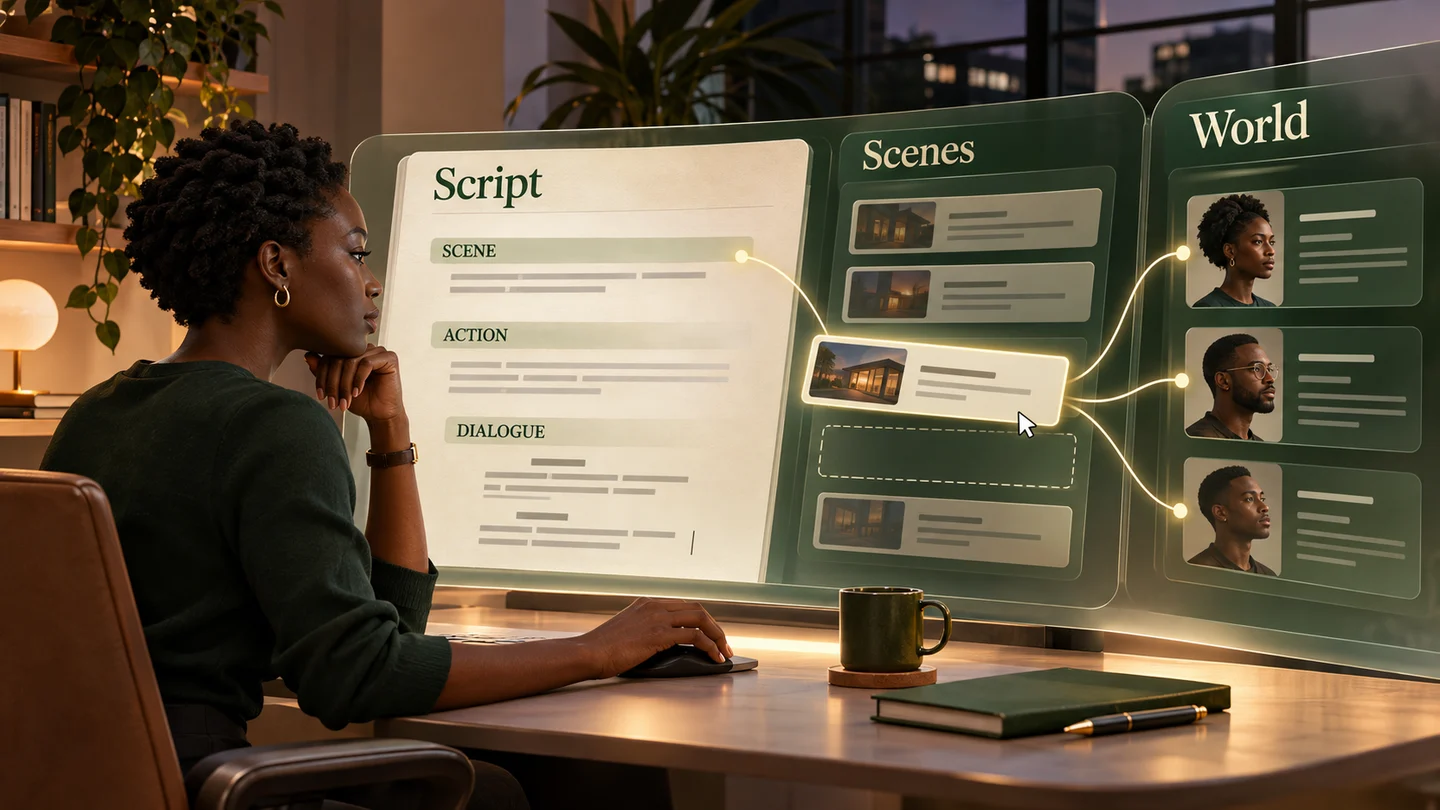
The identity work matters just as much as the visible formatting. Transactions repair missing or duplicated block IDs, while retaining the screenplay attributes and revision information that other views depend on. I can jump to a scene or drag its complete block group to another position without treating every paragraph as an unrelated scrap. The inspector’s scene fields refer to the scene identity, rather than hoping that “the third heading down” will remain the third heading down forever.
Let the world support the script
Imagine a short film in which a character changes their name halfway through development. A simple document can hold the new spelling. A writing workspace also needs to show where that character appears and what the writer has already established about them.
Screenwritr’s World area combines deliberately created profiles with candidates derived from names, aliases and scene headings. The derived material is deterministic, rather than a remote model inventing a biography between keystrokes. When I edit an inferred candidate, that information can become a declared part of the story bible. Removing a declared profile does not silently remove the character’s words from the screenplay. That separation protects authorship: the reference material supports the prose; it does not acquire a licence to rewrite it.
Research belongs in the same working context, but the application does not need unrestricted access to every folder on a machine. The Writing Gallery works from files or folders the user grants. Its traversal has limits, avoids symlink wandering and reports when a scan reaches a safety boundary. The normal metadata cache uses file size and modification time rather than holding complete scripts. That is a practical balance for a browsing feature, with a clear implication: a metadata cache is an aid to finding work, not a cryptographic statement that every byte is unchanged.
Plan with movement, keep the prose in view
The mind map is a separate planning surface with draggable nodes, connections, saved positions and zoom. It earns its place when the problem is relational: a reveal depends on an earlier scene, a character’s decision changes a later beat, or a subplot has become a very confident passenger travelling in the wrong direction.
I can move the planning elements rather than reorganising the entire screenplay just to test an idea. SVG export makes the map portable, although the exported drawing is simpler than the interactive view: straight connections and shortened labels do not reproduce every on-screen curve. I keep that distinction explicit because a useful export need not pretend to be a pixel-perfect photograph of the editor.
Draft History has a similarly specific responsibility. It preserves screenplay blocks. It is not a complete time machine for every research attachment and world field. A writer deciding to restore a script revision should understand the scope of that operation before discovering that a separate character note has a different history.
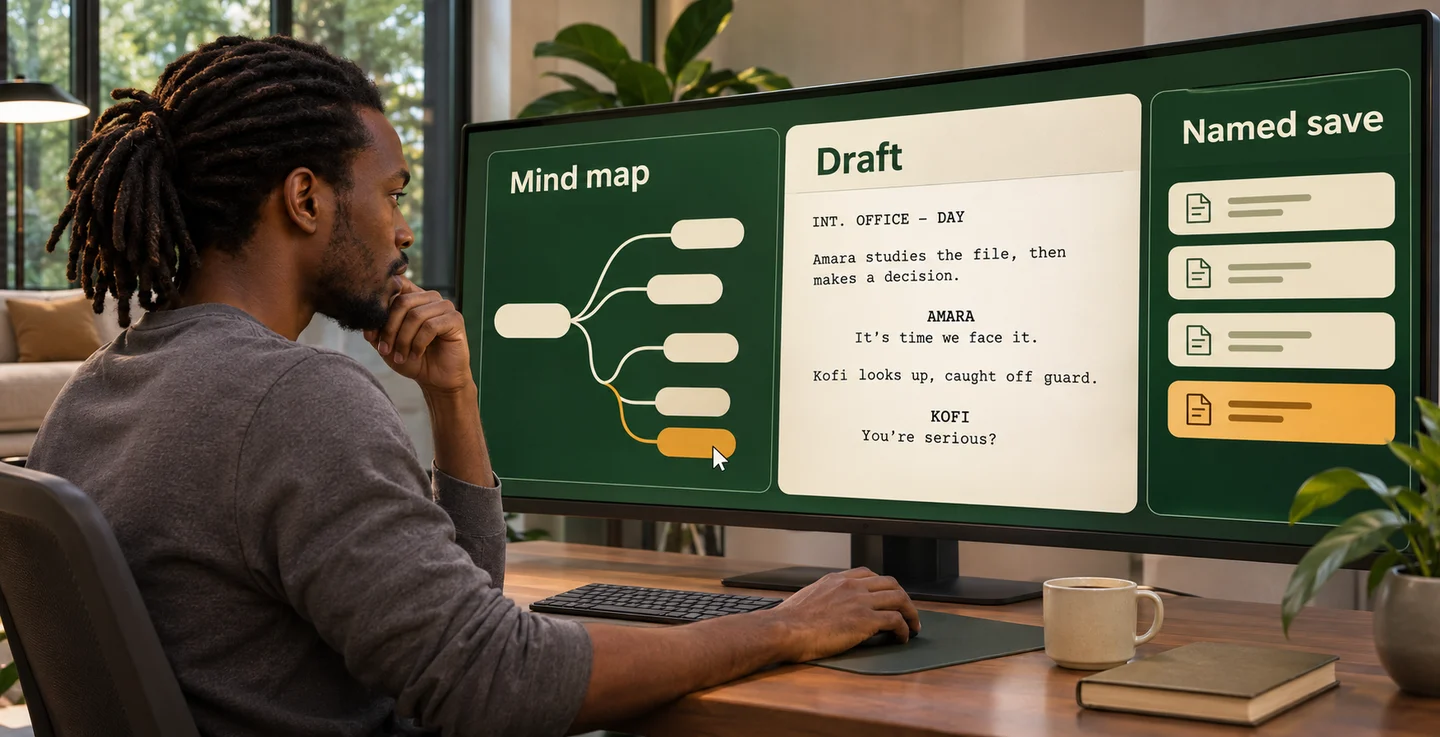
A draft, a named file and a preserved alternative serve different purposes.
Saving deserves more engineering than a reassuring icon
Screenwritr keeps a frequently updated draft separately from the explicit named save. On the desktop, that draft is autosaved after a short pause in editing; the browser fallback uses local storage. The distinction lets a writer recover recent work without quietly changing the meaning of a deliberate Save action.
For named desktop files, I validate the document, serialize writes to the same target, write through a temporary file in the destination directory, sync the data and rename it into place. A valid previous version can become a backup. A damaged old file should not be allowed to replace a good backup merely because it happens to be the latest thing occupying the filename. The revision store keeps a bounded set of distinct content hashes, which avoids filling the history with identical copies wearing different timestamps.
There is also a baseline for detecting external changes. If another program has changed the named file since Screenwritr loaded it, a save can refuse that conflict rather than flattening someone else’s work. Save As provides a way to preserve both versions, with an explicit choice when an overwrite is intended. This is useful for ordinary shared-folder mishaps as well as the moment two windows acquire very different opinions about the same scene.
Recovery has its own envelope and backup handling. A newer draft from the same story can be reconciled after an interrupted envelope update. Closing waits for the renderer’s pending preservation work; failure should leave the window open instead of treating disappearance as success. None of this makes storage infallible. It makes failure a condition with a response, rather than an excuse delivered after the work has gone missing.
Bring work in without pretending every format is the same
The import and export routes are deliberately broad: native documents, Fountain, Final Draft formats and several office or archive sources. I retain a copy of the original import under a hash-based name, so conversion does not have to erase its own starting point. XML handling rejects constructs such as external entities and bounds the input rather than trusting a document because its extension looks respectable.
Final Cut XML is a good example of why precise language matters. Its useful material can become an editable outline: clip headings, timing notes, titles and markers. That is not a reconstruction of every effect and edit decision, and it is not transcription of the audio. A binary Final Cut library needs an XML export before that route applies.
On the way out, screenplay-oriented formats sit alongside DOCX, PDF, HTML and text options. The PDF path uses an Electron print window. The goal is to let a script leave the workspace in a form another person can use, while respecting what each format can actually carry. KIT Scenarist is an interoperability and parity reference for this work; I have not presented Screenwritr as completed feature parity or copied its code, icons or branding into the product.
A bridge that knows whose story it is reading
The Storytellr snapshot packages native story material, a graph with stable identities and Fountain text with a positive revision. It provides a handoff, rather than an automatic promise that another editor has staged or accepted the result. That distinction lets the writing application remain responsible for its document while the next tool remains responsible for its own state.
Screenwritr also has a deliberately bounded MCP interface. It stays off until the user grants access and is revoked on story changes, closing or renderer failure. The transport is read-only stdio, with pagination and response limits. It checks the publisher process, story identity and freshness around reads; supplied story text remains untrusted content rather than instructions to fetch links or run commands.
An assistant can therefore read the current writing context without acquiring a hidden edit channel. The live renderer snapshot can include newer work than the last named save, so I do not confuse “the assistant read this” with “this file is safely saved on disk.” Keeping those responsibilities separate is part of making the integration useful.
What this work sharpened
Screenwritr brings together semantic editor design, desktop persistence, document conversion and restrained tool access. My strongest lesson is that stable identity is a creative feature. It keeps a scene recognisable when its position changes, gives the world view something dependable to refer to, and makes a downstream handoff less dependent on guesswork.
I also learned to make each promise useful at the moment a writer needs it. Draft History restores screenplay blocks; an import translates the structures it understands; the read-only bridge shares current context. Explaining that scope lets a person choose the right next action instead of discover a limitation after trusting the wrong feature with a week of work.
the small header mark is the existing source favicon.
Keep the mystery on the page
Screenwritr gives the writing process a connected home: draft in screenplay form, navigate and rearrange scenes, develop the world, plan relationships visually and preserve the work across revisions. The script can then leave through a supported format or a bounded snapshot handoff.
Building it drew together editor design, document conversion and desktop preservation around one human concern: I want room to take creative risks without adding avoidable storage risks.
The plot can take a dangerous turn. Saving it should remain a fairly boring event. I mean that as a compliment.
Back to the story’s beginning ↑About the work
A writing workstation where scenes, story-world entities and drafts stay connected.
A local screenplay and story-world editor with semantic paragraphs, linked entities, format imports, draft recovery and explicit read-only story sharing through MCP.
Design and technical decisions
Semantic paragraphs, linked scenes and story-world entities form the local Electron workspace. Bounded imports and draft recovery support writing; active-story MCP sharing is explicitly read-only.
Connected work

Software
Orchestra
A production control room for the long journey between an idea and a prepared release.


Software
Storytellr
Turning a screenplay into a space where shots, cameras and timing can be explored.